⚠️ Disclosure: This post contains affiliate links. We may earn a commission at no extra cost to you.
⚠️ Disclosure: This post contains affiliate links. We may earn a commission at no extra cost to you.


Struggling to get a new virtual assistant up to speed without wasting hours? Knowing how to onboard a virtual assistant properly can transform your business efficiency overnight. Most owners rush the process and pay for it in confusion, rework, and trust gaps.
A clear, structured setup turns a stranger into a reliable partner fast.
Per industry benchmarks as of 2026, a well‐structured onboarding process takes roughly one to two weeks for basic setup and four to six weeks to reach full productivity. Yet only about 60% of these engagements stay beyond month three. The difference almost always comes down to how you prepare before day one.
Let’s break down why most onboarding efforts stall before they even begin.
Image source: Web (Bing) / craiyon.com (Web image (fair-use with source credit))
The biggest reason new VA relationships fizzle isn’t a bad hire; it’s a fuzzy start. Without a written scope, your assistant guesses at priorities. Without ready SOPs, she reinvents wheels on every task.
Without early feedback loops, small misunderstandings snowball into frustrated exits. Think of it like moving into a new house: you wouldn’t hand over a key without showing her where the fridge is.
Common failure points include:
When any of those show up, the relationship spends more energy on fixing misalignment than delivering value. A smooth start requires deliberate scaffolding. You’ll see that structure coming up next, but first you need to lock down exactly what the role looks like.
A solid scope statement names three things clearly:
That level of detail lets you compare candidates fairly and later measure performance objectively. It also protects both sides when work spills past the original brief.
Before you draft a listing, map the actual problems you want solved. A common mistake is writing a “must handle everything” job post. That approach pulls in generalists who spread themselves thin.
Instead, decide whether you need a specialist VA (deep expertise in one area like bookkeeping or SEO) or a generalist VA (broad support across admin, email, light design). Specialists charge higher rates but solve complex tasks faster. Generalists are more affordable and flexible for varied, smaller duties.
Image source: Bing (Web (fair-use with source credit))
To define the role:
That structure gives you tangible proof of work quality, communication style, and tech comfort before any longer commitment. It also surfaces red flags early, like missed deadlines or unclear questions.
Ask yourself: “What would my life look like in six months if this VA perfectly owned the core tasks I hate?” Answering that forces clarity on the role’s true impact. You’ll spot overlaps with existing tools or team members, too. Once you have that picture, you can write a description that attracts candidates who actually fit the work you have today, not the fantasy you imagine.
Ready to pick where you’ll find that candidate? Let’s compare the main hiring channels so you can choose the right track for your budget and control preferences.
Your hiring channel shapes speed, cost, and risk. On freelance platforms (like Upwork, Fiverr, or PeoplePerHour), you write the brief, review proposals, interview, and manage payroll yourself. You keep full control and typically pay lower rates, but you spend more time vetting and handling compliance. VA agencies (such as Belay, Time Etc, or Zirtual) pre‐screen assistants, match you to a candidate, and often provide backup coverage.
You trade some cost for hands‐off recruitment and structured support.
| Factor | Freelance Platform | Agency Match |
|---|---|---|
| Initial cost | Lower hourly rate | Higher monthly retainer |
| Vetting effort | You do it all | Agency handles screening |
| Flexibility | Hire/fire freely | Contract terms may apply |
| Backup coverage | None built in | Often provided |
| Best for | Hands‐on owners, tight budgets | Time‐poor founders, need reliability |
If you’re comfortable navigating different hiring platforms and have a clear SOP system, platforms give you direct access to global talent at competitive rates. If you’d rather someone else filter noise and guarantee continuity, an agency’s upfront fee buys peace of mind. Either way, follow the same vetting checklist: ask for a portfolio sample, run a paid trial, and verify communication style over Zoom.
Picking the right channel sets the stage for onboarding. Now let’s walk through the exact steps to welcome your new assistant so she delivers from day one.
A structured onboarding has three phases: Pre‐hire Prep, First Week Setup, and First 30 Days. Each phase builds the last. Rush any phase and you’ll pay later in rework or miscommunication.
Follow this sequence and you’ll have a productive partner within weeks.
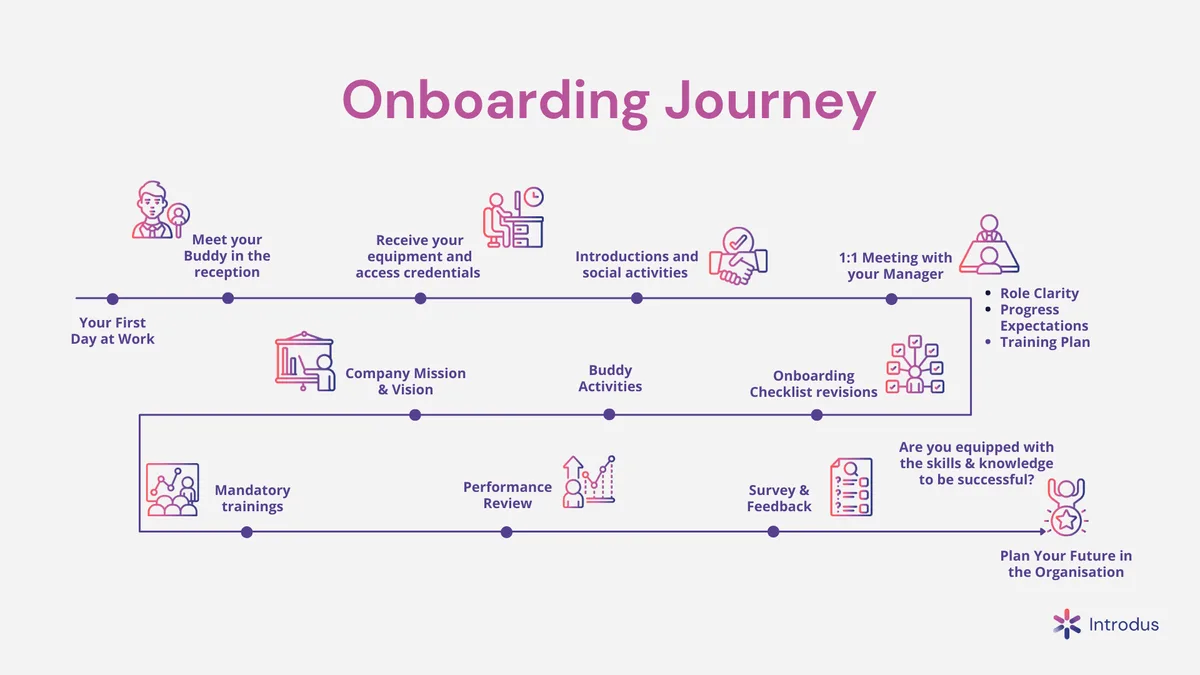
Image source: Web (Bing) / fity.club (Web image (fair-use with source credit))
A consistent cadence prevents small issues from becoming big ones. Commit to:
This rhythm turns ad‐hoc requests into predictable workflows. When structure holds, your assistant feels supported and you stay focused on growth rather than micromanagement. Let’s now look at the pitfalls that derail even the best laid plans.
Even with a solid plan, common missteps can quietly sabotage progress. Spotting these early saves months of frustration. Here are the seven most damaging errors and how to dodge them.

Image source: Bing (Web (fair-use with source credit))
Each mistake stems from a missing structure piece: clarity, trial, security, documentation, rhythm, communication, or inclusion. Address them proactively and you turn potential friction into a strong working partnership. Next, we’ll cover costs, compliance, and tools that keep everything above board.
Understanding pricing and legal basics prevents surprises down the line. Rates vary widely by region and specialization, and contractor classification rules differ by country. Let’s break down the numbers and the safeguards you need.
| Region | Typical hourly rate | Best suited for |
|---|---|---|
| United States | $25 – $75 | Complex, US‐based tasks requiring local nuance |
| United Kingdom | £15 – £50 | EU time‐zone overlap, English‐native clients |
| Philippines / India | $5 – $25 | Cost‐sensitive admin, repetitive volume work |
| Eastern Europe | $15 – $40 | Technical skills, advanced tool proficiency |
These are baseline figures. Specialized roles (legal research, CFO‐level bookkeeping) sit at the higher end. Generic data entry leans lower.
Budget an extra 10, 15% for management time, software subscriptions, and potential turnover replacement.
Misclassifying your VA can trigger tax penalties and benefits claims. In the US, follow IRS independent contractor guidelines to ensure control and independence tests are met. In the UK, review IR35 rules for off‐payroll working.
Generally, if you specify hours, provide tools, and direct how work is done, you lean toward employee status. When in doubt, consult a local employment lawyer.
Paying attention to these details protects both you and your assistant. It also builds a professional foundation that encourages long‐term collaboration. Now let’s address the practical questions owners ask most during hiring.
A 2, 5 hour paid trial gives you enough data to evaluate quality, communication, and reliability without overcommitting. Anything shorter doesn’t reveal true capability. Anything longer wastes both sides’ time if the fit isn’t right.
You can start onboarding without full documentation, but expect friction in weeks two through four. Build SOPs alongside the trial period. Use screen recordings and quick walkthroughs to capture processes as your assistant learns them.
Record short video messages using Loom or similar tools. They eliminate guesswork about tone and context. Pair asynchronous feedback with a weekly live check‐in for real‐time questions and relationship building.
Replace when core expectations mismatch despite clear communication and three or more adjustment cycles. Common replacement triggers include consistent missed deadlines, security lapses, or values misalignment. Don't hesitate to part ways early; prolonged mismatches cost more than a clean restart.
Hiring makes sense when you regularly lose 10 or more hours weekly to tasks that don't require your expertise. Calculate your hourly value and compare it against VA costs. If delegated work frees up high‐value activities worth more than the VA rate, the math supports the hire.
Start with a generalist if your workload spans multiple light tasks. Switch to specialists as volume grows in specific areas like bookkeeping or digital marketing. A targeted specialist provides deeper expertise while a generalist offers broader flexibility during early scaling phases.























You can feel it when a day slips through your fingers — busy, but not effective. True crazy productivity isn’t about cramming more tasks into your…

Earning a consistent $100 per day—roughly $3,000 a month before taxes—is a financial milestone that transforms a side hustle into a meaningful income…

Earning $500 a day while juggling lectures, assignments, and a social life sounds ambitious—because it is. But thousands of students are already doing it…