
Nine common business and admin jobs can be handled remotely by a skilled virtual assistant.
I have hired, trained, and relied on virtual assistants for years. This article draws on that hands-on experience and industry best practices to show which 9 Tasks You Can Outsource To A Virtual Assistant, why they matter, how to delegate them, and what to expect. Read on for clear steps, real examples, and actionable tips to reclaim time and grow your business.

Why outsource to a virtual assistant?
Outsourcing saves time and lowers cost. A skilled virtual assistant can take routine work off your plate. You get focused help without long-term overhead. This frees you to focus on strategy and revenue. Industry surveys show many small business owners double productivity after delegating clerical work.

9 Tasks You Can Outsource To A Virtual Assistant
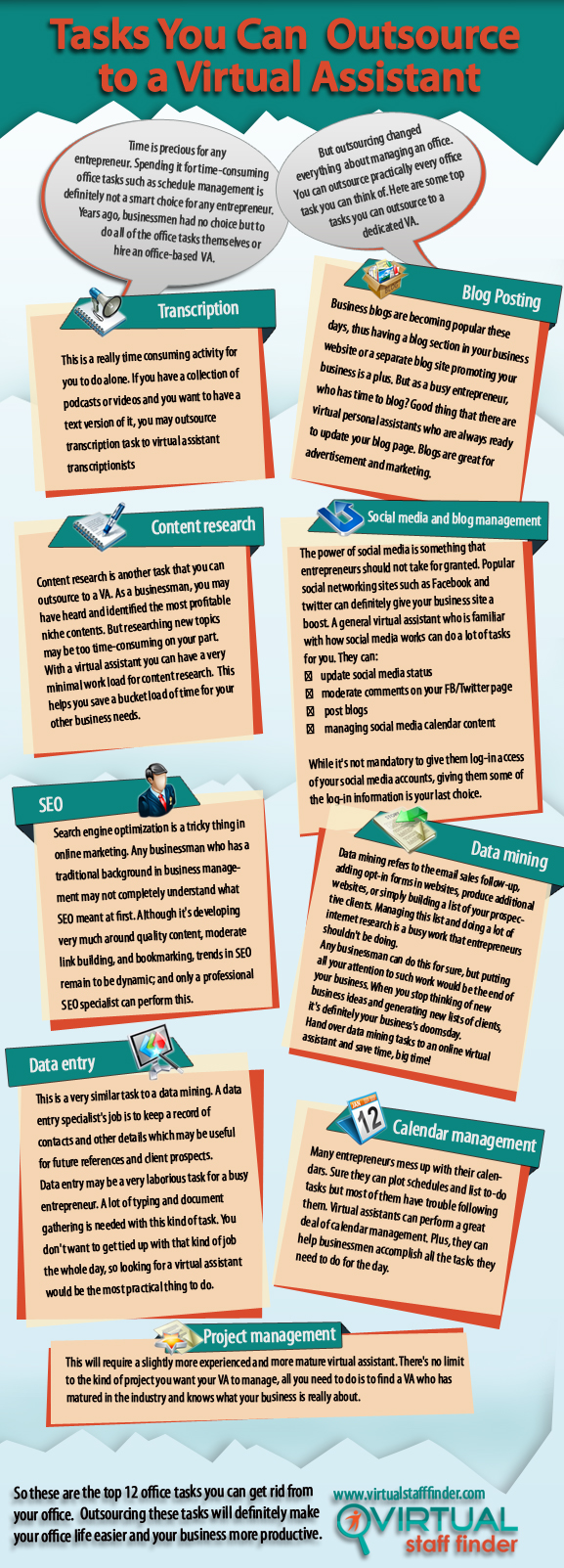
When you explore 9 Tasks You Can Outsource To A Virtual Assistant, think of tasks that repeat, take focus, or need fast response. Below are nine high-impact tasks, with what to expect, tools to use, and quick tips from my experience.
1. Email management and inbox triage
What they do:
- Sort, label, and prioritize emails.
- Draft routine replies and flag urgent messages.
Benefits: - Less distraction and faster response times.
Tools commonly used: - Gmail, Outlook, email templates, canned responses.
My tip: - Start with simple rules and give your VA access to canned replies. Train them on tone and privacy.
When delegating email, outline 3 priority levels and examples for each. This approach made my inbox go from 500 unread to zero within a week.
2. Calendar and appointment scheduling
What they do:
- Manage calendar invites, schedule meetings, and handle rescheduling.
Benefits: - Fewer double bookings and more predictable days.
Tools commonly used: - Calendly, Google Calendar, Microsoft Calendar.
My tip: - Share your availability windows and buffer rules. Let the VA block focus time for you.
A clear scheduling policy prevents conflicts and protects deep work time.
3. Social media management
What they do:
- Create posts, schedule content, and monitor engagement.
Benefits: - Consistent brand presence and steady audience growth.
Tools commonly used: - Buffer, Hootsuite, Later, Canva.
My tip: - Use a content calendar and brand kit. Approve the first 4 posts, then let the VA run weekly scheduling.
Outsourcing social media freed me to focus on strategy while views rose steadily.
4. Customer support and live chat
What they do:
- Respond to basic queries, triage tickets, and follow up on orders.
Benefits: - Faster replies and higher customer satisfaction.
Tools commonly used: - Zendesk, Intercom, Freshdesk, live chat widgets.
My tip: - Provide a response guide and escalation path. Simulate 10 real scenarios during onboarding.
Good scripts keep responses consistent and reduce errors.
5. Bookkeeping and invoicing
What they do:
- Enter receipts, reconcile transactions, and prepare invoices.
Benefits: - Cleaner finances and faster payment cycles.
Tools commonly used: - QuickBooks, Xero, FreshBooks, Excel templates.
My tip: - Start with weekly check-ins and access limited to accounting tools. Use two-step review for the first month.
Clean bookkeeping saved me hours and improved cash flow forecasts.
6. Research and data collection
What they do:
- Gather competitive intel, compile contact lists, and prepare briefs.
Benefits: - Faster decision making and better planning.
Tools commonly used: - Google Sheets, Google Scholar, market research platforms.
My tip: - Define the output format and include examples. Ask for bullet summaries plus raw data.
Clear templates speed up delivery and reduce revisions.
7. Content formatting and editing
What they do:
- Format blog posts, edit drafts, and prepare content for publishing.
Benefits: - Faster publishing and better quality control.
Tools commonly used: - WordPress, Google Docs, Grammarly.
My tip: - Share style guides and sample posts. Start with headlines and meta descriptions they can craft.
A VA who knows your voice can cut production time in half.
8. Lead generation and outreach
What they do:
- Find prospects, craft outreach messages, and schedule follow-ups.
Benefits: - Steady pipeline and more meetings booked.
Tools commonly used: - LinkedIn, CRM tools, email automation.
My tip: - Provide ideal customer profiles and sample outreach sequences. Track responses in a shared CRM.
I learned to test short sequences first. Personalization improves reply rates.
9. Personal errands and travel planning
What they do:
- Book travel, manage reservations, and handle personal admin tasks.
Benefits: - Less mental load and smoother trips.
Tools commonly used: - TripIt, airline portals, booking platforms.
My tip: - Give preferences (seat type, hotels, budgets). Let the VA present 2–3 options per trip.
This practical help made travel less stressful and more efficient.
How to delegate effectively
Good delegation prevents mistakes and saves time. Follow these steps when outsourcing any of the 9 Tasks You Can Outsource To A Virtual Assistant.
- Define the task goal and expected result.
- Provide a checklist and an example of a finished job.
- Set access limits and share passwords securely.
- Start with a trial week and review outputs daily.
- Move to weekly check-ins and set KPIs after two weeks.
My experience shows that one clear template and a short recorded demo cut onboarding time by more than half. Trust, clarity, and small tests work best.

Source: timeetc.com

Pricing, tools, and security
Costs vary by skill, region, and task. Expect hourly rates or package pricing.
Pricing overview:
- Entry-level admin: lower hourly rate.
- Specialized tasks like bookkeeping: higher hourly rate.
Tools to standardize work: - Project management: Trello, Asana.
- Communication: Slack, Zoom.
Security best practices: - Use password managers and two-factor authentication.
- Limit access and rotate credentials.
Always use NDAs for sensitive work. I recommend a trial budget and clear outcomes to avoid surprises.
Source: ecomva.com

Common challenges and how to solve them
Challenge: miscommunication.
Solution: use short written briefs and a 15-minute daily check-in.
Challenge: time zone differences.
Solution: agree on overlap hours and async communication rules.
Challenge: quality control.
Solution: set acceptance criteria and review the first 10 tasks closely.
These fixes are simple and effective. They helped me scale while keeping quality steady.

PAA-style quick questions
What tasks are best for a virtual assistant?
A virtual assistant handles repeatable, admin, and communication tasks like email, scheduling, and research.
How fast can a VA become productive?
With clear guides and examples, a VA can handle simple tasks well within one week and complex tasks in 3–6 weeks.
Can a VA handle confidential work?
Yes, with NDAs, limited access, and secure tools. Use strong onboarding and security measures.
Is hiring a VA cheaper than hiring an employee?
Often yes, because you avoid payroll taxes, benefits, and long-term commitments. Costs vary by role and location.
How do I measure VA performance?
Track KPIs like response time, task completion rate, and error rate. Regular check-ins help keep goals aligned.

Frequently Asked Questions of 9 Tasks You Can Outsource To A Virtual Assistant
What are the top 3 tasks to start with?
Start with email triage, calendar management, and simple social media scheduling. These give the most immediate time savings and are easy to document.
How do I ensure confidentiality when outsourcing?
Use NDAs, password managers, and limit tool access. Audit permissions monthly and require two-factor authentication.
How long does onboarding usually take?
Basic tasks take a few days to one week. Complex tasks like bookkeeping may need 3–6 weeks of close review and training.
Should I hire a dedicated VA or a shared service?
Dedicated VAs offer consistency and deeper business knowledge. Shared services can be cheaper for one-off or low-volume tasks.
Can a VA grow into a long-term team member?
Yes. With proper training and feedback, a VA can handle higher-level tasks and become a reliable long-term partner.
How do I pay a VA?
Common methods include hourly pay, retainer packages, or per-project fees. Use contracts and clear payment terms for transparency.
What are signs a VA is underperforming?
Missed deadlines, repeated errors, and unclear communication are red flags. Address issues with a clear improvement plan.
Conclusion
Delegating 9 Tasks You Can Outsource To A Virtual Assistant is one of the most effective steps you can take to scale your time and business. Start small, document clearly, and measure results. Test one task this week, set a 14-day trial, and watch your productivity improve. If you found this guide helpful, leave a comment, try a trial hire, or subscribe for more step-by-step delegation tips.

Sofia Grant is a business efficiency expert with over a decade of experience in digital strategy and affiliate marketing. She helps entrepreneurs scale through automation, smart tools, and data-driven growth tactics. At TaskVive, Sofia focuses on turning complex systems into simple, actionable insights that drive real results.