
The best tools combine LMS, video, authoring, analytics, and AI to boost outcomes.
If you want your learning to stick, you need the right stack, not just one app. I’ve built digital classrooms for schools, universities, and teams. In this guide, I break down the Best Tools for Online Learning & Digital Education, how they fit together, and how to choose what works for you today and as you scale.

How to Choose the Right Tool for Your Goals
The Best Tools for Online Learning & Digital Education work best when they serve a clear plan. Start with outcomes, then map tools to tasks. Keep it simple, then layer in power as you grow.
Use this checklist before you buy or adopt anything:
- Define the job to be done. Teaching live, building courses, or tracking skills.
- Know your learners. Age, devices, bandwidth, time zone, accessibility needs.
- Check integration. Does it connect to your LMS, SSO, or HRIS.
- Test on real devices. Phones, old laptops, low Wi‑Fi.
- Review privacy. Data retention, export options, admin controls.
- Measure impact. Look for analytics tied to goals you care about.
From experience, small pilots beat long RFPs. Run a two-week test with real learners. Track one result you want. Adjust fast.
Learning Management Systems (LMS)
An LMS is the hub. The Best Tools for Online Learning & Digital Education need a stable home. Use an LMS to enroll users, deliver content, grade work, and pull reports.
Strong options to consider:
- Canvas. Clean UI, rich integrations, great for higher ed.
- Moodle. Open-source, flexible, big plugin library, budget friendly.
- Google Classroom. Simple, free for schools, fast setup.
- Schoology. K‑12 friendly, solid parent view.
- TalentLMS. Lightweight corporate LMS with good UX.
- Docebo. Enterprise features and robust AI recommendations.
Key features that matter:
- Roles and permissions for safety.
- Mobile app that works offline.
- SCORM and xAPI support for tracking.
- Native analytics and CSV export.
Tip from the field: keep your LMS course layout consistent. Same menu. Same naming. Learners move faster and ask fewer questions.

Live Video and Virtual Classrooms
Live sessions make learning feel human. The Best Tools for Online Learning & Digital Education pair real-time video with chat, polls, and rooms. Keep sessions short. Use tools that support interaction, not just streaming.
Top picks:
- Zoom. Breakout rooms, polls, whiteboards, auto captions.
- Google Meet. Fast, simple, great in the Google ecosystem.
- Microsoft Teams. Strong for companies using 365, channels for cohort work.
- BigBlueButton. Built for teaching, open-source, nice for virtual classrooms.
Make live time count:
- Open with a quick poll or a warm-up.
- Use breakout rooms for pair tasks.
- Record and share chapters with timestamps.
- Keep slides light. Use whiteboard for demos.
Bandwidth tip: offer audio-only mode and share slides in advance. It helps learners on weak networks.
Content Creation and Authoring Tools
You need crisp, interactive content. The Best Tools for Online Learning & Digital Education help you build courses, videos, and visuals fast. Think reusable blocks, templates, and responsive design.
Tools I use often:
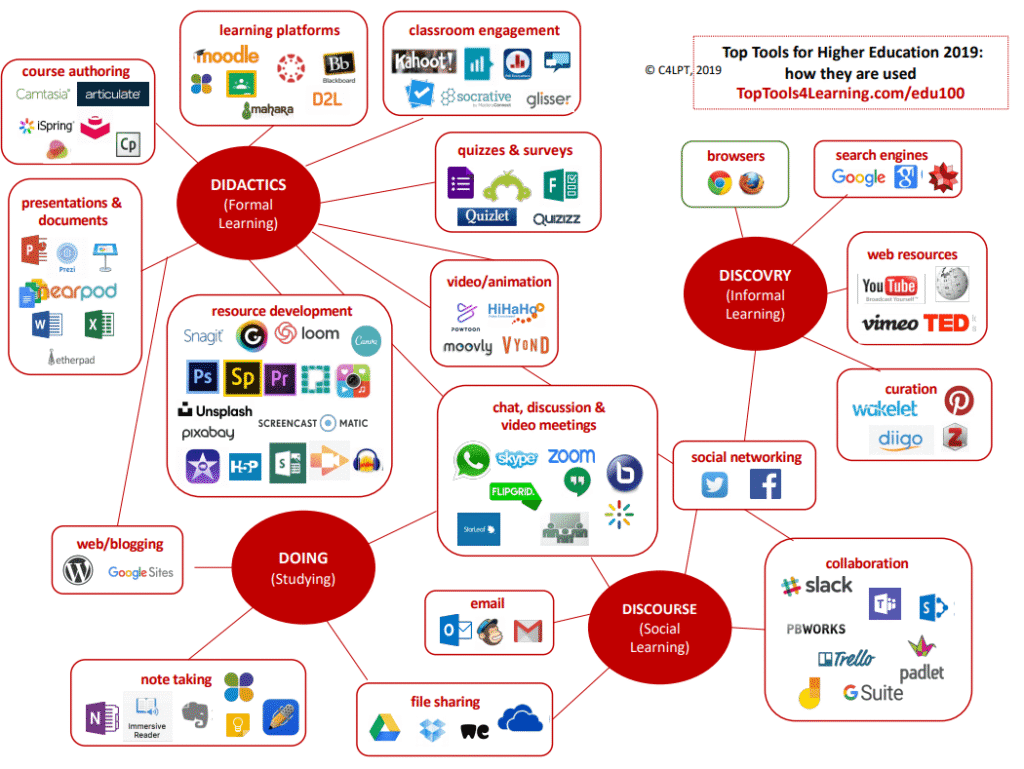
- Articulate 360. Storyline for custom; Rise for fast web courses.
- Adobe Captivate. Powerful interactivity, software sims.
- iSpring Suite. Rapid authoring from PowerPoint.
- H5P. Free interactive content types you can embed.
- Camtasia. Screen recordings with pro polish.
- Loom. Quick async videos with links.
- Canva. Modern slides, infographics, thumbnails.
Best practices:
- Script before you record.
- Keep videos under 6 minutes.
- Add knowledge checks every few minutes.
- Design mobile-first.
Real-world lesson: ship a minimal first version. Watch learners use it. Revise. You will save weeks.
Assessment and Learning Analytics
Good assessment guides action. The Best Tools for Online Learning & Digital Education use quizzes, projects, and data to show progress. Mix low-stakes checks with real tasks.
Reliable tools:
- Google Forms. Fast, free, easy to share.
- Kahoot! and Quizizz. Fun, competitive, great for review.
- Gradescope. Speeds up grading and feedback for problem sets.
- Perusall or Hypothesis. Social annotation that reveals depth of reading.
- LMS analytics or an LRS. Track activity with xAPI for deeper insight.
What to measure:
- Completion and time-on-task.
- Attempts per question.
- Discussion quality.
- Project rubrics and peer review.
Research-backed note: spaced practice and retrieval improve memory. Use weekly low-stakes quizzes and reminders. Scores rise without more lecture time.
Collaboration and Engagement
Learning sticks when people build together. The Best Tools for Online Learning & Digital Education include spaces for notes, boards, and chat. Structure tasks so every voice can show up.
Engagement toolbox:
- Miro or Mural. Visual boards for maps, sprints, and group work.
- Padlet. Quick idea walls and portfolios.
- Slack or Discord. Channels for Q&A and peer support.
- Trello or Asana. Simple project boards for team work.
- Flip. Short video responses to prompts.
Facilitation tips:
- Post weekly prompts and models.
- Set clear roles in group tasks.
- Use rubrics for team feedback.
- Celebrate wins in a public channel.
When I added a weekly “wins wall,” completion rose. People stuck around because they felt seen.

Note‑Taking, Study, and Focus Tools
Skills grow between sessions. The Best Tools for Online Learning & Digital Education include personal study systems. Help learners capture, recall, and manage time.
Great picks:
- Notion or OneNote. Structured notes and linked databases.
- Obsidian. Linked thinking with local files.
- Anki. Spaced repetition flashcards.
- Readwise. Saves highlights and reviews them.
- Forest or Focus To‑Do. Pomodoro timers for deep work.
Simple plan:
- Study in 25-minute blocks.
- Review notes the same day.
- Convert notes into questions.
- Space reviews across the week.
I coach students to tag notes by concept, not week. Retrieval improves fast.
Accessibility and Inclusion
Accessible design helps everyone. The Best Tools for Online Learning & Digital Education should support captions, screen readers, and flexible formats. Build with inclusion from day one.
Tools and features to use:
- Live captions in Zoom, Meet, and Teams.
- Otter.ai for transcripts and notes.
- Immersive Reader for text support.
- Blackboard Ally to check content accessibility.
- Texthelp Read&Write for literacy support.
Inclusive habits:
- Use high contrast and large fonts.
- Write clear headings and alt text.
- Offer audio, text, and video options.
- Provide downloads for offline access.
Many learners will not ask for help. Make access the default so no one feels singled out.

AI Tools for Learning and Teaching
Used well, AI boosts practice, feedback, and content speed. The Best Tools for Online Learning & Digital Education now include AI for draft feedback, Q&A, and study aids. Use AI as a coach, not a crutch.
Useful AI tools:
- ChatGPT or Claude for drafting, explanations, and feedback.
- Perplexity for cited overviews and research leads.
- Elicit for literature discovery and summaries.
- Grammarly and QuillBot for clarity and tone checks.
- Khanmigo for guided problem-solving.
Ethical use tips:
- Ask AI for outlines, examples, and rubrics.
- Verify facts and sources yourself.
- Disclose AI use in course policies.
- Use AI detectors with care; they are not perfect.
Prompt pattern I use: “Here is my goal, audience, constraints, and example. Give three options and one checklist.” It yields clear results fast.
Security, Privacy, and Compliance
Trust is vital. The Best Tools for Online Learning & Digital Education must protect data. Review vendor policies before you add users.
What to check:
- Data location, retention, and deletion controls.
- SSO support and role-based access.
- FERPA, COPPA, or GDPR alignment for your region.
- Clear export options if you switch tools.
- Minimal data collection by design.
Be cautious with remote proctoring. Weigh benefits against bias, stress, and privacy risks. Use open-book formats where possible and design assessments that reward process.
Implementation Roadmap and Sample Stacks
You do not need everything at once. The Best Tools for Online Learning & Digital Education should grow with you. Start small, then iterate.
Simple rollout plan:
- Week 1. Pick one LMS and one live tool. Set naming and templates.
- Week 2. Add one authoring tool and one quiz tool. Pilot with a small group.
- Week 3. Layer collaboration and note-taking. Add analytics dashboards.
- Week 4. Review data. Keep what works. Remove what does not.
Sample stacks:
- K‑12 starter. Google Classroom, Meet, Kami, Kahoot!, Flip, Canva.
- Higher ed. Canvas, Zoom, H5P, Perusall, Gradescope, Hypothesis.
- Corporate L&D. TalentLMS or Docebo, Teams, Articulate 360, Miro, Slack.
- Solo learner. Notion, Anki, Readwise, Loom, Perplexity.
Budget tip: lean on free tiers first. Upgrade only when a paid feature saves hours each week.
Troubleshooting and Best Practices
Problems will happen. The Best Tools for Online Learning & Digital Education stay reliable when you build safety nets. Plan for low bandwidth and busy schedules.
What to set up:
- Onboarding checklists with short how‑to clips.
- Backup links and dial‑in numbers for live sessions.
- Office hours and a clear support channel.
- Weekly digest emails with links and due dates.
Quality habits:
- Keep a change log for your course.
- Ask for one-minute feedback after sessions.
- Refresh content in small batches, not once a year.
- Archive old versions so you can roll back.
When I doubled the number of short how‑to clips, support tickets dropped by half. Small docs save big time.
Frequently Asked Questions of Best Tools for Online Learning & Digital Education
What is the core tech stack I actually need?
An LMS, a live video tool, a simple authoring tool, and a quiz tool. Add collaboration and AI later as you grow.
How do I keep students engaged online?
Use short sessions, frequent checks for understanding, and group tasks. Reward progress and post public wins.
Which tools work best for low bandwidth?
Use text-first LMS pages, audio-only options, and downloadable PDFs. Share slides before class and record for later.
Are AI tools safe to use in class?
Yes, when used with clear rules and human review. Disclose use, verify facts, and focus on learning process, not shortcuts.
How do I measure real learning, not just clicks?
Use projects, rubrics, and spaced quizzes tied to outcomes. Track skills over time, not only completion rates.
Conclusion
Build your stack around outcomes, not hype. Start with a simple core, add only what adds value, and measure the impact on learning. You now have a clear map of the Best Tools for Online Learning & Digital Education, plus tips to use them well.
Pick one improvement to launch this week. Run a small pilot, review the data, and share what you learn. Want more deep dives and tool stacks? Subscribe and tell me what you are building next.

Sofia Grant is a business efficiency expert with over a decade of experience in digital strategy and affiliate marketing. She helps entrepreneurs scale through automation, smart tools, and data-driven growth tactics. At TaskVive, Sofia focuses on turning complex systems into simple, actionable insights that drive real results.