⚠️ Disclosure: This post contains affiliate links. We may earn a commission at no extra cost to you.
⚠️ Disclosure: This post contains affiliate links. We may earn a commission at no extra cost to you.

Image source: Web (Bing) / pexels.com (Web image (fair-use with source credit))
A week ago a reader asked whether they could hand off email entirely to software. The honest answer to whether a virtual assistant can answer emails is more specific than yes or no. It depends on the type of message, the tone required, and how much context you've given the assistant.
Most business email is repetitive in predictable ways. Greeting, question, quick answer, sign-off. Large Language Models handle that pattern well.
Microsoft's 2023 Work Trend Index found that 44% of knowledge workers saved time on email tasks using AI. But saving time and handling every message well are different things. That's where the decision tree comes in.
Yes, an AI virtual assistant can answer emails. As of 2026, tools like Copilot, Gemini, and Superhuman handle routine replies well. They draft acknowledgments, answer FAQ-style questions, and route simple requests.
They also miss nuance in sensitive or high-stakes threads. The right move is a hybrid workflow.
An AI email assistant runs four steps every time an email arrives. The order matters. Skip one and the whole thing falls apart.
First, the system ingests the message. That means pulling in the sender, subject, body, attachments, and any prior thread context. Tools like Microsoft Copilot pull from Outlook directly.
Third-party assistants use OAuth to connect to Gmail or Graph.
Next comes intent classification. The model reads the email and labels it. Is this an invoice question?
A meeting request? A complaint? An FYI?
Classification accuracy sits around 85 to 95% on labeled datasets. That's good, not perfect.
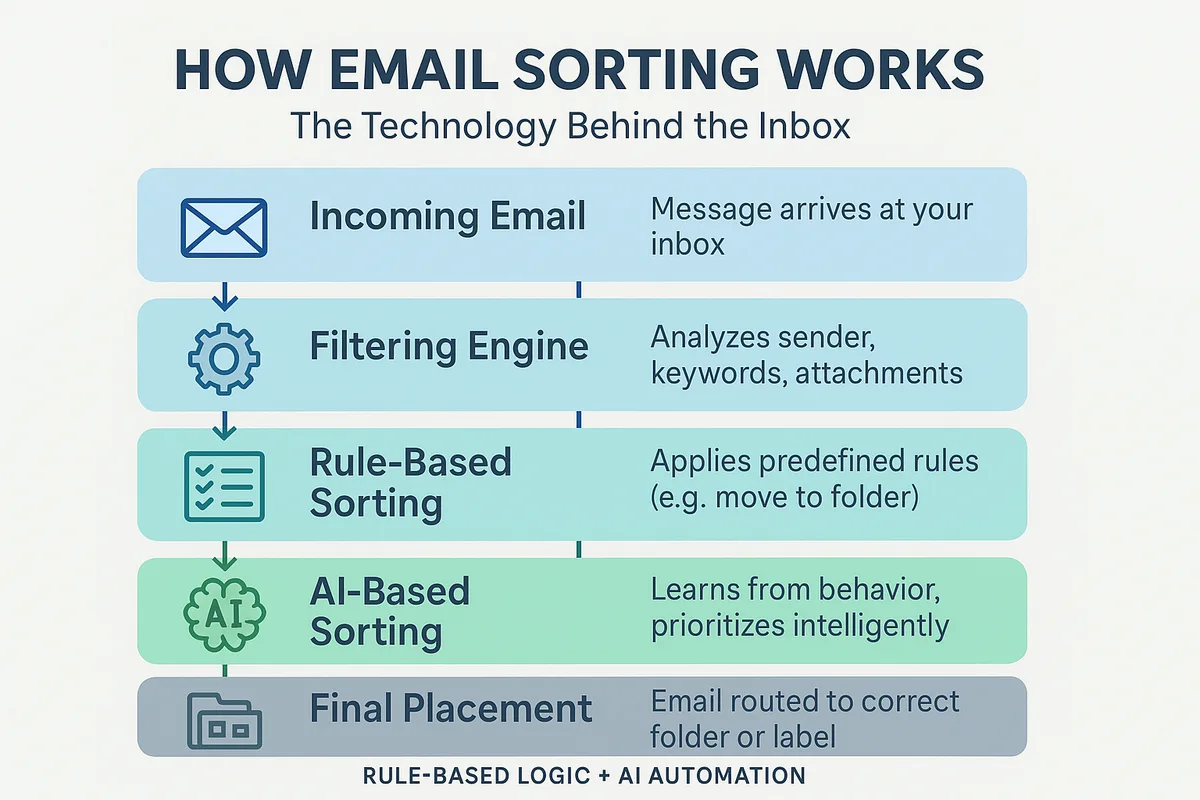
Then comes response generation. A large language model drafts a reply using your brand voice, the sender's history, and any instructions you've set. This is the part most people demo.
It's also the part most likely to hallucinate if context is missing.
Finally, the system applies a decision gate. If confidence is high and risk is low, it sends. If either is off, it flags the email for human review.
Every serious deployment uses this layer. Without it, you're one prompt injection away from a bad send.
The technical foundation comes from transformer-based models trained on huge corpora. GPT-4o, Claude 3.5, and Gemini 1.5 are the workhorses. Each has trade-offs.
Some are better with long context. Some are cheaper per token. Some are faster in production.
You can think of this as an extension of the virtual assistant workflow you'd build for a human teammate. The steps are similar. The speed is completely different.
This is the heart of the decision. The same assistant can be excellent on one kind of email and disastrous on another.
Here's where AI shines. Simple inquiries like "what are your hours" or "can I get the invoice again" go out in seconds. Meeting scheduling and calendar coordination work well when the model can see your calendar.
FAQ-style support questions deflect real volume. First-response acknowledgments keep inboxes healthy during holidays. Tier-1 triage routes urgent items before they pile up.
Here's where AI stumbles. Sensitive topics fall apart fast. Pricing negotiations, legal questions, and anything involving an upset customer need a human.
Relationship-dependent emails fail too. A returning client writing in a familiar tone gets a robotic reply instead of warmth. Context-heavy threads lose their history.
Multilingual messages work, but translation quality varies by model and language pair.
| Email Type | AI Performance | Best Path |
|---|---|---|
| Simple FAQ | Excellent | Auto-send |
| Scheduling / logistics | Very good | Auto-send with human spot-check |
| Billing / invoice questions | Good | Draft, human approves |
| Complaints / escalations | Poor | Human handles |
| Negotiations and pricing | Poor | Human handles |
| VIP / long-tenured clients | Mixed | Human handles |
| Legal or compliance topics | Poor | Human handles |
Prompt injection is a real risk. Research on this is public. The paper by Greshake and others in 2023 demonstrated how adversarial text in an email can override model instructions.
You can read the framework at NIST's AI Risk Management page for how organizations think about this class of risk.
Understanding where AI works and where it doesn't is the whole game. It's also the same discipline you apply when delegating tasks to a virtual assistant who is human instead of software.
The upside is real. Response time drops from hours to under a minute. Inbox triage happens automatically.
Cognitive load drops because you stop answering routine messages all day. Small teams can scale to more clients without adding headcount. Coverage extends across time zones and weekends without fatigue.
The downsides aren't small either. Tone comes off generic when it matters most. Hallucinated commitments happen.
Wrong dates and made-up confirmations still show up in drafts. Long threads lose context. Prompt injection is an unpatched threat class.
And setup isn't zero effort. Getting the voice and escalation rules right takes weeks.
Here's the trade-off table:
| Benefit | Drawback |
|---|---|
| Sub-minute response time | Tone can feel flat |
| 24/7 coverage | Hallucinated commitments |
| Lower cognitive load | Context loss in long threads |
| Scales without headcount | Prompt injection risk |
| Consistent formatting | Setup takes 1 to 2 weeks |
| Deflects FAQ volume | Human review still needed for complex mail |
If you want a real workflow behind the automation, build a virtual assistant workflow around clear rules first. That foundation makes AI deployment faster and safer.
The Microsoft Work Trend Index data on email time savings comes from the Microsoft Research work trends site. It's the closest thing to a hard number on this.
Setup looks harder than it is. You're really just building rules, connecting a model, and installing a human checkpoint.
Step 1. Audit your inbox for a week. Categorize every email.
Most businesses land between 60 and 80% routine and 20 to 40% complex. If routine volume is under 20 emails a day, AI probably isn't worth the setup cost yet.
Step 2. Connect your email platform. OAuth for Gmail or Microsoft Graph for Outlook.
Enterprise users often go through Microsoft 365 or a custom GPT app. Consumer tiers don't always offer the data handling guarantees you need.
Step 3. Define your classification rules. What counts as routine?
What counts as sensitive? Write these out like a mini style guide. Include triggers for escalation like negative sentiment, legal keywords, or VIP senders.
Step 4. Configure your response voice. Include your preferred tone, sign-off, common phrases, and banned phrases.
Feed the model a few examples of replies you're proud of. This single step has the highest impact on how the output feels.
Step 5. Set a confidence threshold. If the model is below 80% confident, it drafts but doesn't send.
You review the queue each morning.
Step 6. Test for two weeks on draft-only mode. Read every reply.
Fix misfires. Update the prompt.
Step 7. Enable auto-send for Tier 1 emails only. Keep everything else in human review.
Step 8. Review the log weekly. Track errors, tone drift, and missed context.
Adjust the prompt as needed.
This mirrors how you'd train a virtual assistant with clear SOPs and feedback loops. Documentation is everything. A well-defined process is what makes either kind of assistant perform.
You'll want to pair this with strong internal operating procedures, the way you'd use SOPs for virtual assistants.
Most failed AI email setups share the same mistakes. They're fixable. They just need to be avoided.

The biggest one is skipping the human-in-the-loop gate. Teams turn on full auto-send on day one. Then a bad reply goes to a client or a regulator.
This is the exact anti-pattern the NIST AI Risk Management Framework warns about.
Second is prompt injection. Adversarial text embedded in an incoming email can override model instructions. As of 2026, defenses exist but they're imperfect.
Keep sensitive workflows behind human approval.
Third is over-templating. AI replies become predictable. Recipients notice.
Rotate tone and length. Mix formal with casual when appropriate.
Fourth is ignoring data handling. Consumer LLM APIs may train on your inputs. For anything involving business or personal data, use an enterprise tier with a zero-retention agreement.
Fifth is skipping feedback loops. Without weekly review, tone drifts and errors compound.
Sixth is trusting hallucinations. AI sometimes confirms dates that never existed. Always verify dates, amounts, and commitments before send.
The pattern holds across every deployment. Weak process, weak results. If you're already working with a human virtual assistant, the same principles apply.
Read up on how to manage virtual assistant tasks well, and you'll have the discipline you need for the AI side too.
The answer depends entirely on your volume and risk tolerance. If you handle fewer than 20 emails a day, stick to drafting. The setup costs outweigh the time saved.
For high-volume teams over 100 emails daily, full automation on routine tiers pays off fast.
Consider your data sensitivity. Handling client financials or personal health data? Use enterprise models with zero-retention agreements.
A standard consumer API might train on your data. You need contractual guarantees.
Look at your current team structure. If you already manage a human virtual assistant, you have the SOPs needed for AI. Check our guide on finding the right virtual assistant to align your human and AI capabilities.
The transition works best when the human focuses on complex relationships while the AI handles the noise.
Start with a pilot. Run the system for two weeks in draft-only mode. Measure error rates.
If you keep catching hallucinated dates, your prompts need work. If the tone feels off, adjust your voice guide.
No, it rarely replaces one completely. It handles the repetitive tasks like acknowledgments and routing. Humans still manage nuanced conversations, conflict resolution, and high-stakes negotiations.
The best setup uses AI as a filter so the human can focus on value-adding interactions.
It makes up facts that aren't true. This is the biggest risk. Always keep a human in the loop for high-value clients.
Verify every date and commitment before sending. Automated gates help, but they are not perfect.
Generally, yes. However, some regions are moving toward disclosure rules. You must check local regulations.
In healthcare or finance, strict compliance laws apply. Ensure your AI provider holds the necessary security certifications and data handling agreements.
It can flag them, but it shouldn't be the only line of defense. Spam filters usually catch obvious threats first. AI can help categorize suspicious emails.
It should not delete unknown senders without human review to avoid blocking legitimate business inquiries.
Setup takes about two weeks. You need time for auditing and prompt tuning. Full autonomy on routine emails usually happens in four to eight weeks.
You will see immediate time savings on drafting, but accuracy improves as you provide feedback.
It depends on your budget and privacy needs. GPT-4o and Claude 3.5 are strong options. They balance speed, cost, and context window size.
For enterprise needs, check specific vendor documentation. Most major models work well if prompted correctly for your specific niche.
















Still wondering how to train a virtual assistant? You’re not alone. Millions of people and businesses want help from AI but don’t know where to start. The good…
Struggling to get a new virtual assistant up to speed without wasting hours? Knowing how to onboard a virtual assistant properly can transform your business…

 Image source: Bing (Web (fairuse with source credit)) How to find a virtual…