⚠️ Disclosure: This post contains affiliate links. We may earn a commission at no extra cost to you.
⚠️ Disclosure: This post contains affiliate links. We may earn a commission at no extra cost to you.

Work faster, juggle less, and finally feel in control—that’s the promise of a well-chosen productivity tool. But with thousands of apps, platforms, and automations flooding the market, the real challenge isn’t finding any tool; it’s deliberately picking the right one and weaving it into your daily rhythm so it actually sticks.
Too many professionals collect tools like trading cards, only to end up with notification fatigue and scattered tasks across six different tabs. This guide gives you a structured, expert-led approach to choosing productivity software that fits your world, rolling it out so your team embraces it, and refining your setup as your needs evolve.
Grabbing the most popular app because a colleague swears by it often leads to frustration. Productivity is deeply personal and highly contextual. A tool that exhausts a creative professional with visual clutter might be exactly what a data-driven project manager needs.
A systematic process protects you from several costly traps:
Committing to a selection method that starts with your own workflows, not a feature list, sets the stage for genuine time savings and less mental friction.
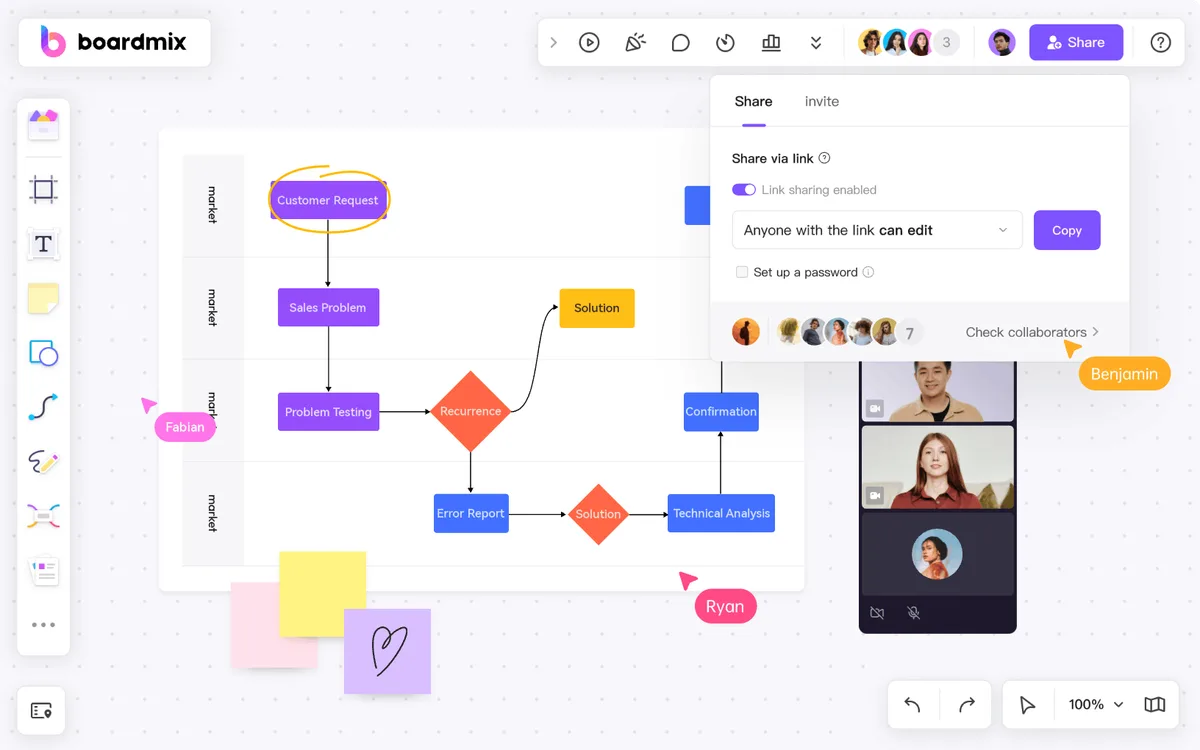
 A well-orchestrated digital workspace is often the visible outcome of a thoughtful tool selection journey.
Credit: www.penguinsolutions.com
A well-orchestrated digital workspace is often the visible outcome of a thoughtful tool selection journey.
Credit: www.penguinsolutions.com
Before you browse a single app marketplace, document exactly what you’re trying to improve. This step alone can prevent you from being seduced by shiny marketing.
Grab a notebook or a whiteboard and track your work for three to five days. Record:
Once you have a shortlist of friction points, you’ll naturally gravitate toward tools that solve a specific problem rather than generic “productivity boosters.”
Vague goals like “be more organised” don’t tell you whether a tool is working. Frame your intentions using the SMART framework—Specific, Measurable, Achievable, Relevant, Time-bound.
| Goal | Metric to Track |
|---|---|
| Speed up client response time | Average reply window drops from 4 hours to under 90 minutes within 60 days |
| Reduce missed project milestones | Number of overdue tasks decreases by 40% over the next quarter |
| Cut time spent in status meetings | Weekly meeting length shrinks by 30% because updates are visible in the tool |
Defining success in hard numbers makes it easy to evaluate a trial and decide whether to keep, replace, or abandon a tool.
Not every glowing review is trustworthy, and not every recommendation from a colleague fits your context. A well-rounded research phase combines multiple sources.
Public app store ratings can be skewed by outdated versions or incomplete user profiles. Instead, scan for patterns in written reviews from the last six months. Pay attention to:
Community forums, Reddit threads, and dedicated Slack groups often give you a more candid picture than polished testimonial pages.
Ask three or four peers what they actually use after hours or on Fridays when real work happens, not what their company officially rolled out. Listen for phrases like “I keep coming back to it because…” or “I abandoned it after the setup ate my whole Sunday.” Those lived experiences often predict your own.
If you work with a part-time or external team, consider what your go-to collaborators are already comfortable using. Introducing a tool that clashes with their established workflow is a sure-fire way to stall adoption.
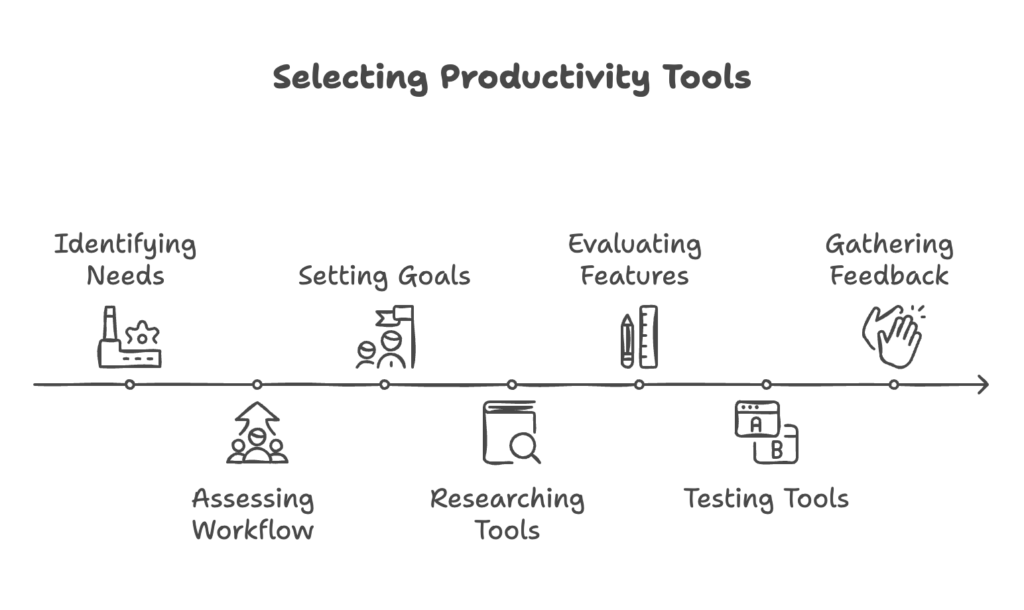 Instead of chasing everything a tool can do, zero in on the capabilities that directly address your biggest workflow gaps.
Create a simple two-column table. The “non-negotiable” column should only contain items that directly link back to the pain points you identified earlier. Everything else goes into “value-added extras.”
| Must-Have Features | Nice-to-Have Extras |
|---|---|
| Real-time collaborative editing | Built-in whiteboard for brainstorming |
| Calendar integration with two-way sync | Custom colour-coded project labels |
| Mobile app with offline access | Time tracking per task |
| Granular permission controls | Gantt chart view |
In practice, if a tool nails every essential but lacks one glossy extra, it’s almost always the better long-term bet than a feature-packed option that fumbles the basics.
During your evaluation, scrutinise the less glamorous specs:
These constraints often surface in the small print after you’ve already migrated data—reading them now saves awkward reversals later.
Free trials and freemium tiers are your most reliable decision-making tools, but only if you test with intent.
Instead of casually clicking around, set up one real project that mirrors your typical workload. Invite the same colleagues who would use the tool daily. Replicate a genuine workflow from start to finish: assign tasks, set deadlines, upload documents, and hold a brief feedback session.
Running a focused pilot reveals whether the interface gets in your way under real pressure. A common mistake is testing with artificial, low-stakes tasks that never expose the tool’s true friction points.
After the trial week, ask every participant three simple questions:
Compile the answers before looking at pricing or admin dashboards. If the majority wouldn’t voluntarily return, no amount of extra features can rescue the fit.
A brilliant tool that lives in isolation rarely delivers its full value. Integration determines whether your data flows effortlessly or gets trapped.
List the three to five apps your team absolutely depends on—calendars, email, cloud storage, CRM. Verify direct, native integrations for each. If only a third-party connector like Zapier or Make bridges the gap, account for the extra cost, latency, and maintenance. Native integrations almost always feel faster and break less frequently.
Moving years of project history is often the most underrated hurdle. Look for tools that allow bulk CSV imports with field mapping, not just manual entry. Test the migration with a small batch of actual data to see how formatting, attachments, and comments survive the transfer.
A short demonstration of thoughtful integration planning can clarify the process: Watch an integration walkthrough.
A $12-per-user monthly fee looks straightforward, but the true cost includes:
Before signing up for a full year, run the numbers for at least 12 months, including the cost of any required add-ons. If the tool saves each team member 2 hours a week, a $50 monthly plan practically pays for itself. If it only saves 15 minutes, a simpler, cheaper alternative often wins.
Productivity tools often handle sensitive client notes, financial projections, or proprietary processes. Treat them with the same scrutiny you’d give any other business software.
A tool that speeds up your day but exposes confidential information is a liability, not a productivity aid.
Most tool implementations fail because people never form a habit around them, not because the software is broken. Deliberate onboarding changes that.
Skip the 47-slide deck. Instead, build a brief toolkit:
When you invest in structured online courses and micro-training, people internalise the tool faster and resist slipping back into old email chains.
Roll the tool out to a single project or a small pilot group. Let those early adopters become internal champions who help their peers. Only after the early calls and support requests taper off should you expand to the full team. This phased approach also protects you from company-wide disruption if the tool ultimately isn’t the right fit.
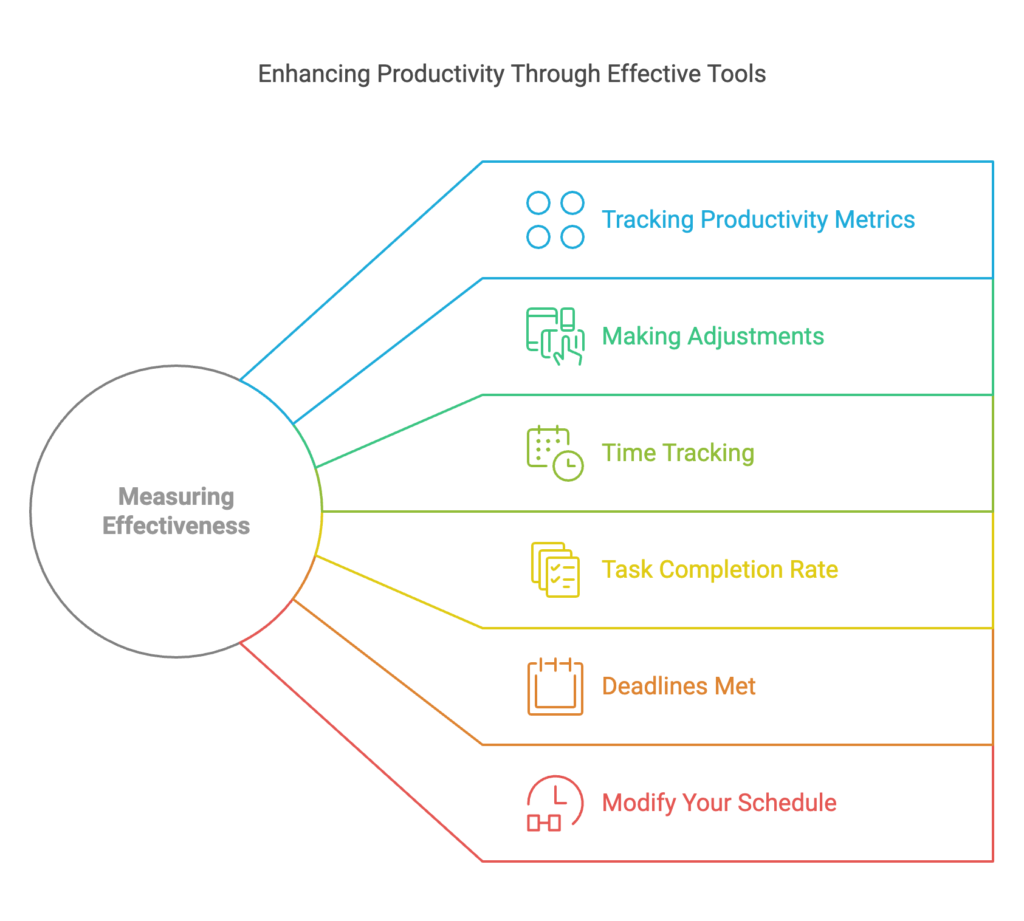 Automated reports inside a tool are helpful, but the real test is whether the numbers align with the objectives you set during the selection phase.
Go back to the SMART goals you established earlier. Track metrics like:
Many tools include built-in reporting, but you can also maintain a simple shared spreadsheet if the native analytics don’t match your needs.
Every quarter, run a five-minute review:
Retire or replace tools that have become shelfware. Maintaining a lean stack is a form of productivity in itself.
Even experienced managers fall into a few predictable traps. Recognising them upfront preserves time, goodwill, and budget.
Tools alone don’t create productive days; the habits you pair with them do. Bake these practices into your routine.
Use your task manager to identify each morning’s one “must-complete” item. Block time for it on your calendar and silence notifications during that window. If the tool doesn’t support a do-not-disturb mode, set your computer’s focus assist independently.
Templated email responses, recurring task templates, and automatic status updates free up brain cycles. Zapier, Make, or native workflow builders can move data between apps without your intervention. Just remember to review automations monthly so you’re not mindlessly fuelling an outdated process.
As your workload grows, consider offloading routine administrative work to a skilled assistant. Delegating tasks like data entry, research, or inbox triage frees you to focus on creative and strategic work. To make that collaboration seamless, coordinate with your remote support through your chosen tools and establish clear handoff protocols. When you’re ready to hire help, spend time recognising strong competencies during the selection process so you find someone who slots into your workflows without friction.
A tool’s potential expands when you know how to customise it. Make a habit of continuous upskilling through short video walkthroughs, advanced user forums, and structured online courses. Even 20 minutes a month spent learning a new shortcut or a smarter automation can compound into hours saved.
How many productivity tools should I use at once?
Most effective professionals settle on a core stack of three to five tools: one for tasks and projects, one for communication, and one for notes and documentation. Beyond that, layer only when a specific, repeated need clearly demands a dedicated solution.
What if I pick the wrong tool after a trial?
Treat it as a learning loop, not a failure. Document what didn’t work, export your data, and move on. The insight you gain about your workflow often prevents a more expensive misstep later.
Should I use separate tools for personal and work productivity?
Context-switching between a personal and professional version of the same habit can create friction. Some people thrive with a single system that separates projects by workspace or client; others need a hard boundary. Test what feels mentally restful rather than overwhelming.
How long should a trial period last?
Two to four weeks is the sweet spot. Less than a week doesn’t let the novelty wear off; more than a month often leads to data lock-in before you’ve formally decided.
The best productivity tool is the one you trust and actually use. That trust comes from a selection process that begins with your own reality, not someone else’s glowing recommendation. Define your pain points, test ruthlessly, integrate thoughtfully, and regularly weed out what no longer serves you.
Treat your tool stack as a living system. As your projects, team size, and goals shift, your apps should shift too—without throwing away the habits that keep you productive. For more strategies on streamlining your work and building effective workflows, browse our productivity insights collection. The right tool, paired with the right approach, turns busyness into meaningful output.

Sofia Grant is a business efficiency expert with over a decade of experience in digital strategy and affiliate marketing. She helps entrepreneurs scale through automation, smart tools, and data-driven growth tactics. At TaskVive, Sofia focuses on turning complex systems into simple, actionable insights that drive real results.














Thinking about how to use a virtual assistant for small business can feel overwhelming when you already wear every hat in your company. The truth is, hiring…
 If you’re drowning in inbox management and still cannot finish your core…
 Image source: Web (Bing) / pinterest.com (Web image (fairuse…