⚠️ Disclosure: This post contains affiliate links. We may earn a commission at no extra cost to you.
⚠️ Disclosure: This post contains affiliate links. We may earn a commission at no extra cost to you.

You've got the help, but the work isn't flowing. The gap between hiring someone and actually handing off work is where most delegations fall apart. Learning how to give tasks to a virtual assistant requires more than just sending a quick message.
It needs a clear system to stop rework before it starts.
Research into remote workforce management shows that unclear initial instructions can increase project timeline delays by up to 30% during the onboarding phase. Once you understand the exact mechanics of handoff, the entire relationship shifts from constant correction to steady progress. Let's walk through the variables that change your approach.
Most people treat delegation like dropping a file into a shared drive and hoping for the best. This approach often leads to confusion, missed deadlines, and wasted billable hours. When a task lacks context, your virtual assistant spends more time asking questions than completing work.
You end up doing the task yourself because it feels faster than explaining it again.
The real friction comes from assuming your mental model is already clear to them. You might think a request is obvious because you live inside the business every day. However, your assistant needs explicit parameters to act independently.
Without these boundaries, they either hesitate unnecessarily or proceed with assumptions that don't match your expectations.
A well-defined handoff saves time for both parties. It turns a potential back-and-forth loop into a straightforward execution. When instructions are precise, you get results that match your vision without constant oversight.
This clarity is the foundation of a productive working relationship.
How to give tasks to a virtual assistant: Write a clear brief in your project management tool. Include the goal, steps, deadline, and acceptance criteria. Attach all files and record a video walkthrough if needed.
Set permissions carefully and confirm update expectations. Review the work against your original standards.
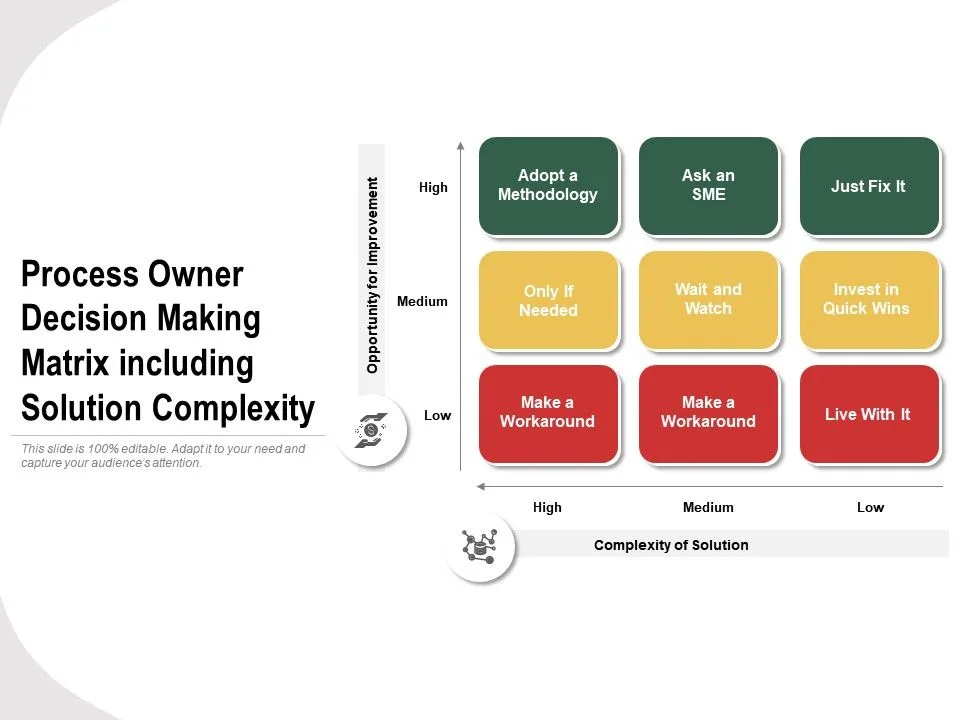
Not every task requires the same level of preparation. The right way to delegate shifts based on four main factors. Understanding these variables helps you choose the correct communication channel and level of detail for each assignment.
| Variable | Low Requirement | High Requirement |
|---|---|---|
| Complexity | Data entry | Strategic planning |
| Frequency | One-time project | Daily recurring report |
| Sensitivity | Public blog posts | Client financial records |
| Autonomy | Follow a script | Make independent judgments |
When you map a task against these four areas, you instantly know how much detail to provide. A simple, low-frequency, public task needs far less setup than a complex, daily, sensitive assignment.
Delegation works best when it follows a repeatable process. This workflow ensures every task has a clear origin, purpose, and expected outcome. Following these steps reduces ambiguity and builds trust over time.
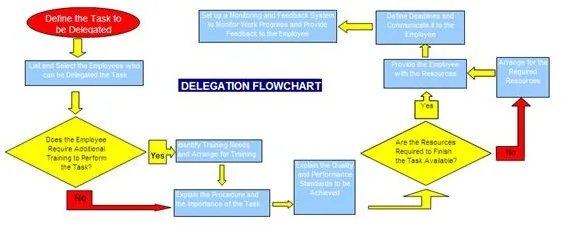
This systematic approach removes guesswork from the handoff process. It also provides a reliable audit trail for both you and your assistant. Over time, you will notice fewer corrections and faster completion rates.
For more insights on streamlining operations, exploring [remote work best practices] can further refine your daily routines.
Even with a solid process, certain habits can quickly undermine your efforts. Recognizing these common traps early helps you correct course before frustration sets in.
Avoiding these errors requires discipline and a willingness to slow down initially. The upfront investment in clear communication pays for itself many times over in reduced rework.
Theory becomes clearer when applied to real-world situations. These scenarios illustrate how different variables dictate your delegation strategy.
Each scenario highlights how varying complexity, sensitivity, and frequency changes your approach. By analyzing these patterns, you can tailor your method to fit any type of workload.
The right technology makes delegation significantly easier. These tools provide structure for your workflow and create clear records of every assignment.
| Tool Type | Purpose | Examples |
|---|---|---|
| Project management | Task tracking and file organization | Asana, Trello, Monday.com |
| Screen recording | Visual walkthroughs and demos | Loom, Screencast-O-Matic |
| Password management | Secure credential sharing | LastPass, 1Password |
| Time tracking | Monitoring hours and productivity | Toggl, Harvest |
| Communication | Async messaging and updates | Slack, Microsoft Teams |
Start by selecting one project management platform as your single source of truth. Every task should live there with complete context attached. This prevents requests from getting lost across multiple email threads or chat apps.
Use screen recording tools for anything that requires visual demonstration. A two-minute walkthrough beats a three-page written explanation. Your assistant can pause and rewind the video whenever they need clarity.
For secure access management, rely on dedicated password managers rather than sharing credentials via email. These tools let you grant temporary permissions that expire automatically. This protects sensitive information while still allowing necessary collaboration.
Consider exploring [Time Etc vs BELAY] comparisons when selecting a virtual assistant service, as these platforms often integrate with the tools mentioned above to streamline delegation workflows.
A task is ready to delegate when you can clearly define what success looks like. If you can write out the expected outcome in one paragraph, it is likely ready to hand off. Vague goals are the primary indicator that a task needs more development before delegation.
Write instructions in a dedicated project management tool rather than scattered emails. Use bullet points, numbered steps, and specific acceptance criteria. Include attachments, links, and examples in the same location as the brief.
Set a regular check-in schedule during onboarding, then gradually increase the gap between updates. Daily check-ins work well for new assignments, while weekly updates may suffice for established routines. Let your assistant propose their preferred update cadence based on task complexity.
Yes, if you establish proper security protocols before granting access. Use password managers for credential sharing, limit permissions to only required tools, and have assistants sign NDAs. Regular audits of access rights help maintain security over time.
Review the original brief to identify where communication broke down. Provide corrected instructions without assigning blame, then update your SOP if needed. Treat mistakes as system improvements rather than personal failures.
Expect one to two weeks for full onboarding and system setup. This includes creating SOPs, establishing communication channels, and completing first trial assignments. Subsequent task delegations become much faster once these foundations are in place.
















You’re staring at a calendar packed with conflicting meetings, and a virtual assistant to reschedule appointments is the fix you need. The overlap grows worse…

You’ve got a dentist appointment in two hours and a meeting that ran long. A virtual assistant to cancel appointments can save you from a noshow fee, but only…
You’ve got meetings stacked on top of meetings, and a virtual assistant for Google Calendar sounds like the fix. The promise is simple: something keeps your…