⚠️ Disclosure: This post contains affiliate links. We may earn a commission at no extra cost to you.
⚠️ Disclosure: This post contains affiliate links. We may earn a commission at no extra cost to you.


Are you juggling multiple tasks as a virtual assistant and feeling overwhelmed? Imagine having the right tools that help you finish your work faster and with less stress.
Productivity tools can change the way you manage your time, communicate, and organize your tasks. You’ll discover simple yet powerful tools that make your daily work smoother and more efficient. Ready to boost your productivity and impress your clients? Keep reading to find out how.
Virtual assistants need strong tools to stay organized and efficient. The right productivity tools help manage tasks, track time, communicate clearly, and share files easily. These tools save time and reduce stress. They keep work smooth and help meet deadlines.
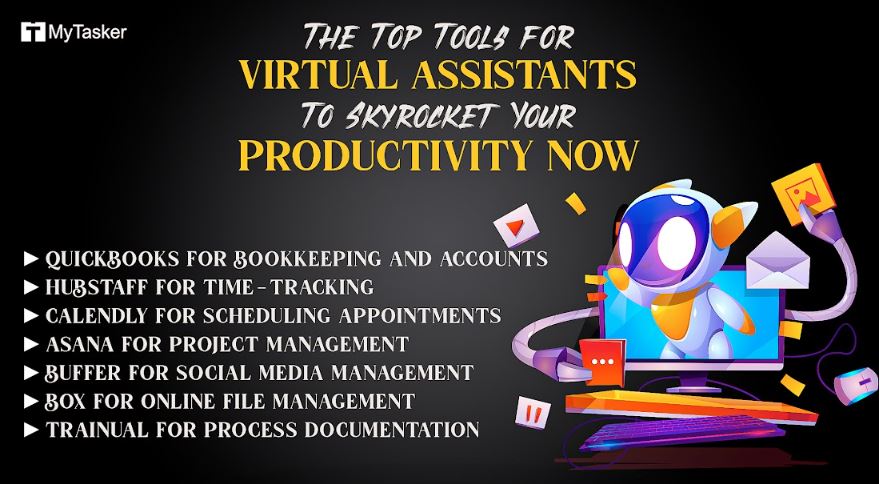
Task management apps help virtual assistants organize work. These apps list tasks, set priorities, and track progress. They make it easy to break big projects into small steps. Popular apps include Trello, Asana, and Todoist. They keep tasks visible and deadlines clear. This helps avoid confusion and missed work.
Time tracking software records hours spent on tasks. It helps virtual assistants understand where time goes. This data improves productivity and billing accuracy. Tools like Toggl and Harvest are simple to use. They offer reports that show task duration and breaks. This helps manage time better and work smarter.
Communication platforms connect virtual assistants with clients and teams. Clear communication reduces mistakes and speeds up tasks. Apps like Slack, Microsoft Teams, and Zoom offer chat, calls, and video meetings. These tools keep conversations organized and easy to follow. Good communication saves time and builds trust.
File sharing solutions make sharing documents fast and safe. Virtual assistants can upload, edit, and share files from anywhere. Google Drive, Dropbox, and OneDrive offer secure storage and easy access. These tools prevent lost files and version confusion. They help keep all important files in one place.
Credit: mytasker.com
Automation tools help virtual assistants save time and work smarter. These tools handle repetitive tasks fast. This frees up more time for important work. Using automation reduces errors and keeps tasks consistent. Virtual assistants can focus on tasks that need creativity and personal touch.
Email automation tools send messages automatically. They can sort emails, reply to common questions, and follow up with clients. This reduces the time spent on daily email management. Virtual assistants can set schedules to send emails at the best times. This keeps communication steady without extra effort.
Social media scheduling tools help plan posts ahead. Virtual assistants can create posts and set times for publishing. This keeps social media active without manual posting every day. Scheduling tools often include features to track engagement and manage multiple accounts. This makes social media work easier and more organized.
Workflow automation connects different apps and tasks. It moves information between tools without manual work. Virtual assistants can create workflows to handle tasks like data entry, reminders, and approvals. This speeds up processes and reduces mistakes. Workflow automation helps keep projects on track and saves valuable time.
Collaboration tools help virtual assistants work smoothly with teams. They keep communication clear and tasks organized. These tools save time and reduce mistakes. Teams can share ideas and updates quickly. The right tools make remote teamwork easier and more efficient.
Project collaboration tools let teams plan and track work together. Virtual assistants can assign tasks and set deadlines. Everyone sees what needs to be done and by when. Progress updates happen in one place. This keeps projects on track and avoids confusion.
Real-time editing tools allow multiple users to work on documents at once. Changes appear instantly for all to see. Virtual assistants can help edit reports or create content with the team. This speeds up the writing process and cuts down emails. It ensures everyone works on the latest version.
Virtual meeting tools connect teams through video or audio calls. They support screen sharing and chat features. Virtual assistants can schedule meetings and take notes easily. These tools help keep everyone involved and informed. Meetings happen smoothly without needing to be in the same place.

Credit: vpvirtualassistants.com
Choosing the right productivity tools can shape your daily workflow as a virtual assistant. The right set of tools helps you stay organized, manage tasks, and communicate clearly. It saves time and reduces stress.
Different tools serve different purposes. Selecting tools that fit your unique work style is key. Consider your tasks, budget, and how well tools work together.
Start by listing your daily tasks. Identify which tasks take the most time or cause confusion. Think about tools that can simplify these tasks. Prioritize tools that help with scheduling, communication, or document management. Focus on tools that match your skill level and work habits.
Set a clear budget before choosing tools. Many tools offer free versions or trials. Use these to test features without spending money. Choose tools that give good value for the price. Avoid paying for features you will not use. Keep expenses manageable as a freelancer or small business.
Check if tools work well with each other. Integration saves time by syncing calendars, emails, and files. Choose tools that fit your devices, like PC or mobile. Compatibility with your current software is important. Avoid tools that cause extra work or technical issues. Smooth connections improve productivity and reduce frustration.
Maximizing the efficiency of productivity tools helps virtual assistants work smarter. Using tools correctly saves time and reduces stress. Simple steps can improve how tools support daily tasks.
Focus on clear setups, regular reviews, and ongoing learning. These tips keep tools useful and effective over time. Small changes can lead to big improvements.
Create clear workflows for each tool. Define steps that match your daily tasks. Automate repetitive actions to avoid manual work. Keep workflows simple and easy to follow. Test setups before full use to find problems early.
Check your tools often to ensure they work well. Remove features or apps that you do not use. Update software to access new features and fixes. Compare tools to find better options if needed. Keep only tools that save time and effort.
Learn new features and shortcuts regularly. Watch tutorials or read guides to improve skills. Practice using tools to increase speed and accuracy. Share tips with other virtual assistants for extra help. Stay curious and open to learning new methods.

Credit: inboxdone.com
The best productivity tools for virtual assistants include task managers like Trello, communication apps like Slack, and time trackers like Toggl. These tools help organize tasks, improve communication, and manage time efficiently, boosting overall productivity in virtual work environments.
Virtual assistants can improve time management using tools like Toggl or RescueTime. These apps track work hours, identify distractions, and help allocate time wisely. Setting clear priorities and using calendar apps also enhance scheduling and deadline adherence.
Virtual assistants benefit from communication tools like Slack, Microsoft Teams, and Zoom. These platforms offer instant messaging, video calls, and file sharing, enabling smooth collaboration with clients and teams regardless of location, improving workflow and reducing misunderstandings.
Yes, task management tools like Asana or Trello are essential. They help virtual assistants organize tasks, set deadlines, and track progress. These tools streamline workflow, increase accountability, and ensure timely completion of client projects.
Choosing the right tools helps virtual assistants work smarter. These apps save time and reduce stress. Staying organized means completing tasks faster and better. Try different tools to see what fits your style. Small changes can lead to big results.
Keep learning and adjusting your toolkit often. Productivity tools support your success every day. Simple steps make a big difference in your work life.

Sofia Grant is a business efficiency expert with over a decade of experience in digital strategy and affiliate marketing. She helps entrepreneurs scale through automation, smart tools, and data-driven growth tactics. At TaskVive, Sofia focuses on turning complex systems into simple, actionable insights that drive real results.













How can I earn $500 per day as a student? 9 realistic side hustles, time tips, and a step-by-step plan to reach $500/day while studying.
Answered: How can I make $100 a day legit? Learn proven side hustles, online jobs, and simple steps to earn $100 daily—no scams, quick start tips.

Free up hours by outsourcing 9 Tasks You Can Outsource To A Virtual Assistant — practical tasks to delegate and boost productivity fast.