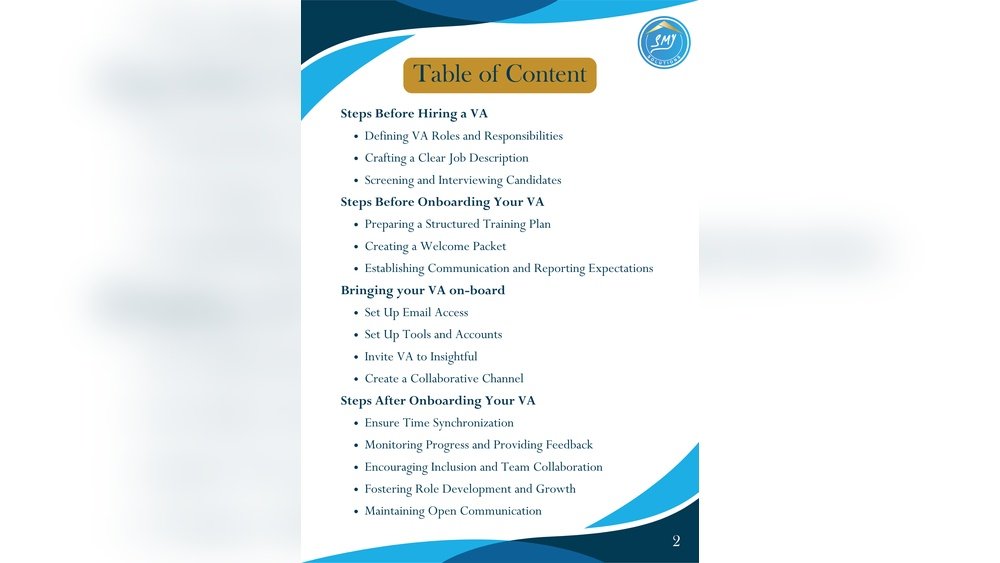

Starting with a new virtual assistant (VA) can feel overwhelming. You want to make sure everything goes smoothly from day one.
That’s where a VA onboarding checklist becomes your best friend. It helps you organize each step clearly, so nothing important gets missed. Imagine having a simple guide that saves you time, reduces confusion, and sets your VA up for success right away.
Keep reading, and you’ll discover exactly what to include in your checklist to make your working relationship strong and productive from the start.
Preparing For Va Onboarding
Preparing for VA onboarding sets the stage for a smooth working relationship. Clear preparation helps both you and your virtual assistant start well. It reduces confusion and saves time during the first days. Taking time to plan ensures your VA knows what to do and what to expect.
Identifying Roles And Responsibilities
Define the tasks your VA will handle. List daily and weekly duties clearly. Include tasks like email management, scheduling, or data entry. Specify which tasks are priorities. This helps your VA focus on what matters most. Clear roles prevent overlap and missed tasks.
Setting Clear Expectations
Explain work hours and communication methods. Set deadlines for tasks and projects. Share your preferred style for updates and reports. Be honest about challenges and workload. Clear expectations build trust and reduce misunderstandings. Your VA will know how to meet your needs.
Gathering Essential Documentation
Collect all documents your VA needs access to. Include login details, guides, and templates. Prepare company policies and workflow charts. Organize files in one easy-to-find place. This saves time and helps your VA work independently. Well-prepared documents support quick learning.
Technical Setup
Setting up the technical side is a key step in VA onboarding. It ensures smooth work flow and clear communication. Preparing the right tools and access helps the VA start quickly and work effectively.
Choosing The Right Tools
Pick tools that match the tasks and skills of your VA. Use simple software for communication, project management, and file sharing. Avoid complex systems that slow down work. Test tools to ensure they work well on both ends. Clear tools make tasks easier and save time.
Configuring Access And Permissions
Set up access carefully to protect your data. Give your VA only the permissions they need. Use separate accounts for different tools. Change passwords regularly and share them securely. Control access to sensitive information to keep your business safe.
Ensuring Data Security
Protect your data with strong security measures. Use encrypted connections like VPNs or secure Wi-Fi. Back up files regularly to avoid data loss. Educate your VA about safe internet habits. Security helps prevent hacks and keeps your work safe.
Training And Resources
Training and resources are key parts of the VA onboarding checklist. They help new virtual assistants understand their roles and perform tasks well. Proper training sets clear expectations and builds confidence. Good resources keep assistants informed and ready to work.
Creating Training Materials
Start with clear, easy-to-follow guides. Use simple language and step-by-step instructions. Include screenshots or videos to explain tasks visually. Cover basic tools, company policies, and common workflows. Update materials regularly to keep them accurate and helpful.
Scheduling Orientation Sessions
Plan live sessions to welcome new virtual assistants. Introduce the team and explain company goals. Use this time to answer questions and clarify doubts. Keep sessions short and focused. Record them so assistants can watch later if needed.
Providing Ongoing Support
Offer continuous help through chat, email, or calls. Check in regularly to track progress and solve problems. Share new updates and resources to keep skills fresh. Encourage open communication to build trust and improve performance.

Credit: www.notion.com
Communication Strategies
Good communication is key for a smooth virtual assistant onboarding process. Clear strategies help build trust and avoid confusion. They keep everyone on the same page and boost productivity. Use practical steps to set strong communication habits early on.
Establishing Communication Channels
Choose tools that suit your team’s needs. Email, messaging apps, or project management tools work well. Make sure your VA knows which channels to use for different tasks. Clear channels reduce missed messages and delays. Keep it simple and consistent.
Setting Regular Check-ins
Schedule frequent meetings to discuss progress and challenges. Short daily or weekly check-ins keep tasks on track. Use video calls or voice chats to build rapport. Regular check-ins create accountability and help catch problems early. Stick to a set time and agenda.
Encouraging Feedback
Invite your VA to share thoughts and ideas openly. Feedback improves workflows and solves issues faster. Create a safe space where your VA feels heard. Ask questions and listen carefully. Positive feedback habits lead to better teamwork and results.
Performance Tracking
Performance tracking is a key part of the VA onboarding checklist. It helps you see how well your virtual assistant works. You can find out what they do well and where they need help. This keeps your team strong and your projects on track. Clear steps make tracking simple and effective.
Defining Key Performance Indicators
Start by choosing clear goals for your VA. These goals are called Key Performance Indicators (KPIs). KPIs show what success looks like. Examples include task completion rates, response time, and quality of work. Setting KPIs helps both you and your VA understand expectations.
Using Monitoring Tools
Use simple tools to check progress. Time trackers, project management apps, and communication platforms help. These tools give real-time updates on tasks and deadlines. They make it easy to spot problems early. Choose tools that are easy for your VA to use.
Conducting Performance Reviews
Hold regular meetings to talk about progress. Reviews give your VA feedback on strengths and areas to improve. Use specific examples and keep the tone positive. Set new goals after each review. This keeps motivation high and work quality strong.

Credit: www.myvirtudesk.com
Troubleshooting Common Issues
Troubleshooting common issues during VA onboarding helps keep the process smooth. Problems often arise but can be solved quickly. Recognizing issues early saves time and stress. Clear steps ensure your new VA starts strong and confident.
Handling Technical Difficulties
Technical problems block progress and cause delays. Check internet connections and device compatibility first. Provide simple guides for software setup. Use remote support tools to fix issues fast. Test all systems before assigning tasks to prevent errors.
Resolving Miscommunication
Misunderstandings slow down work and cause frustration. Set clear expectations from the start. Use simple language and short messages. Repeat key points to confirm understanding. Encourage questions and regular updates to avoid confusion.
Adjusting Workflow Processes
Workflow may need changes to fit your VA’s style. Watch for bottlenecks or repeated mistakes. Simplify steps where possible. Use task checklists to keep work organized. Adapt processes based on feedback and results for better efficiency.
Optimizing Va Integration
Optimizing VA integration is essential for smooth collaboration and high productivity. Proper integration helps the virtual assistant understand your business needs clearly. It also ensures tasks are done efficiently and on time.
Organizing the workflow and communication channels supports better results. A well-integrated VA becomes a valuable team member. It boosts your business operations and saves time.
Streamlining Task Management
Clear task lists reduce confusion and save time. Use simple tools to assign and track tasks. Prioritize important tasks to keep progress steady. Regular updates help spot problems early. This keeps the workflow smooth and efficient.
Fostering Team Collaboration
Encourage open communication between your VA and team. Share goals and expectations to align efforts. Use chat apps or video calls for quick talks. This builds trust and improves teamwork. A connected team works better together.
Scaling Va Support
Start with core tasks and grow VA duties gradually. Train your VA for new skills step by step. Monitor performance and give feedback often. Adding more VAs can spread workload evenly. Scaling support helps your business grow steadily.
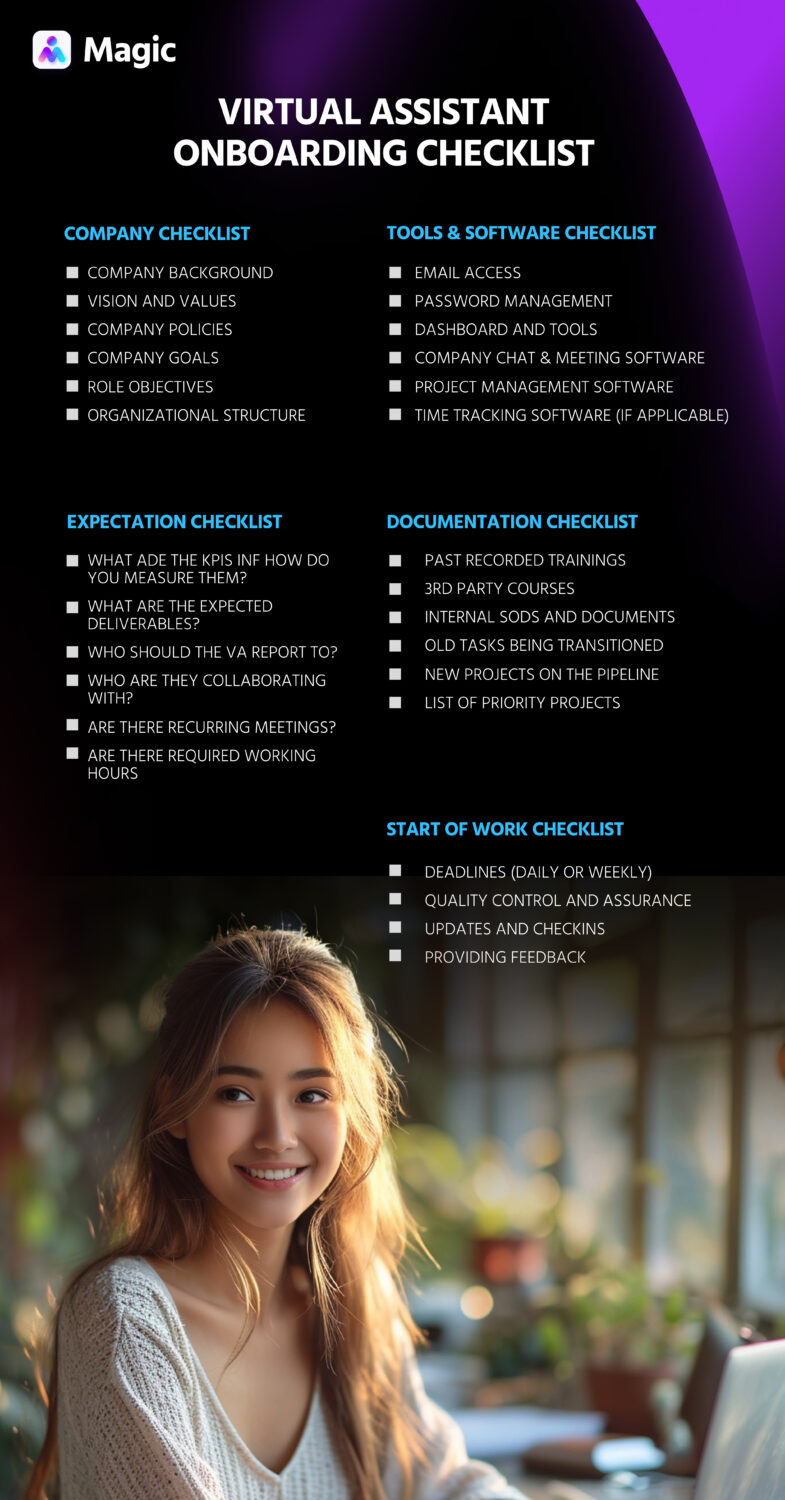
Credit: getmagic.com
Frequently Asked Questions
What Is Included In A Va Onboarding Checklist?
A VA onboarding checklist includes tasks like document submission, system access setup, training schedules, and communication protocols. It ensures smooth integration and clear expectations for virtual assistants.
How Does A Va Onboarding Checklist Improve Productivity?
It organizes essential steps, reduces confusion, and speeds up the learning curve. This leads to quicker task execution and better overall productivity for virtual assistants.
Why Is Communication Important In Va Onboarding?
Effective communication sets expectations, clarifies tasks, and builds trust. It ensures the VA understands their role and can collaborate efficiently with the team.
How Often Should A Va Onboarding Checklist Be Updated?
Update the checklist regularly to reflect new tools, processes, or company policies. This keeps onboarding relevant and aligned with current business needs.
Conclusion
A clear VA onboarding checklist helps start work smoothly. It saves time and avoids confusion. Each step guides new team members well. Good communication builds trust and teamwork fast. Keep the checklist updated as needs change. This simple tool supports strong, lasting work relationships.
Use it to ensure success from day one.

Sofia Grant is a business efficiency expert with over a decade of experience in digital strategy and affiliate marketing. She helps entrepreneurs scale through automation, smart tools, and data-driven growth tactics. At TaskVive, Sofia focuses on turning complex systems into simple, actionable insights that drive real results.