⚠️ Disclosure: This post contains affiliate links. We may earn a commission at no extra cost to you.
⚠️ Disclosure: This post contains affiliate links. We may earn a commission at no extra cost to you.

Image source: Bing (Web (fair-use with source credit))
Hiring a virtual assistant for multi timezone scheduling sounds straightforward until your client in London keeps showing up an hour late because DST hit differently than expected. That's not a typo. It's the core reason most people pick the wrong tool.
Per our research into scheduling platform behavior, standard calendar links handle basic time conversion but routinely miss overlap conflicts, recurring-meeting drift during DST transitions, and back-to-back handoff gaps between zones. As of 2026, the market offers both AI-driven platforms and human VA services that claim timezone capability, but they deliver very different results under real global pressure. Picking between them starts with understanding where each one actually breaks down.
A virtual assistant for multi timezone scheduling is either an AI-powered platform or a human service that coordinates meeting times across multiple regions. AI tools automate availability sharing and conflict detection. Human VAs handle exceptions, negotiations, and complex rescheduling that software struggles with.
Both solve the same problem, just through different mechanisms.

Image source: Bing (Web (fair-use with source credit))
Single-timezone scheduling barely requires a second thought. You drop a Calendly link and everyone books within their own local window. Then someone from Singapore joins the mix and suddenly you're doing mental math every time a meeting gets proposed.
That friction compounds fast.
What most people don't realize until they've lost a client over a double-booking error is that timezone scheduling exposes every weak point in a calendar system. Basic tools show times correctly on the surface. They fail when two people in overlapping zones propose the same slot.
They miss DST transitions that shift recurring weekly meetings by an hour without warning. And they do nothing to help handoffs between teams in Tokyo, New York, and Lagos when coverage spans 16 hours.
The real cost isn't a missed appointment once in a while. It's the slow erosion of trust. International clients stop booking when they can't confirm what time a meeting actually happens.
Remote team members start resenting the constant ping-pong that slows everything down. That's why this comparison matters beyond convenience. It's about protecting how your organization operates globally.
Understanding the trade-off between AI automation and human coordination helps you see which path actually scales.
The two paths available to anyone running a distributed operation are fundamentally different in how they handle timezone complexity.
| Factor | AI Scheduler Platform | Human VA Service |
|---|---|---|
| Speed | Instant booking links | Manual email/chat coordination |
| Overlap Detection | Automated if configured | Depends on VA attention |
| DST Handling | Tool-dependent, often automatic | Requires proactive rule updates |
| Exception Handling | Limited, follows preset logic | Flexible, reads context |
| Scale | Scales linearly with seats | Scales with hiring |
| Monthly Cost | $10 to $30 per user typically | $15 to $50 per hour depending on scope |
AI schedulers like Calendly, SavvyTime, and Clockwise excel at removing friction for predictable bookings. They show global availability, prevent double-bookings in real time, and keep recurring meetings anchored correctly through seasonal clock changes. Per platform documentation, most support 40-plus timezones with automatic conversion on meeting invites.
Human VAs help with appointment scheduling when the situation goes beyond automated rules. Rescheduling a client who just landed in a new city? Sorting out a last-minute conflict involving three timezones with no clear overlap window?
Those moments expose where AI hits its ceiling. A skilled VA reads tone, understands urgency, and negotiates solutions no algorithm would think to propose.
The trade-off boils down to predictability versus adaptability. AI handles routine volume efficiently. Humans handle chaos gracefully.
Most growing operations end up needing both at different stages.
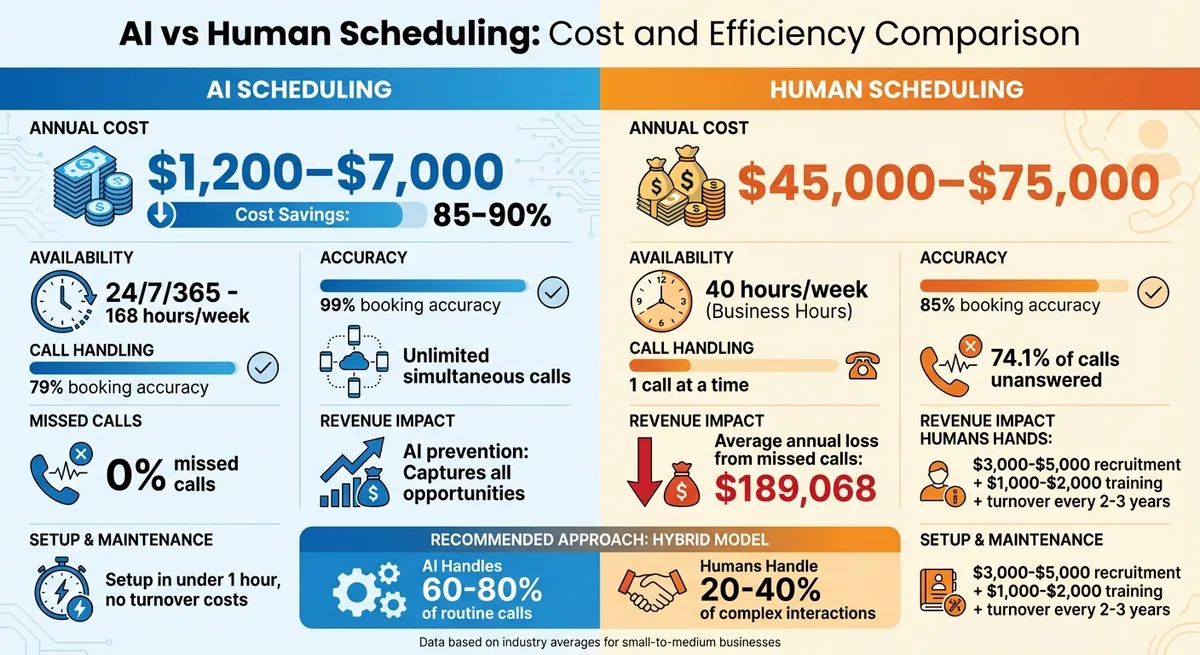
Image source: Bing (Web (fair-use with source credit))
Feature lists on scheduler product pages look identical until you test them under cross-zone pressure. What separates reliable tools from fragile ones comes down to a handful of capabilities that most buyers overlook.
Tools lacking overlap detection will quietly allow double-bookings when users in Sydney and Berlin propose the same UTC slot. Tools without proper DST handling will drift one hour deeper every spring and fall for recurring weekly calls. That drift is almost invisible until someone misses a quarterly review.
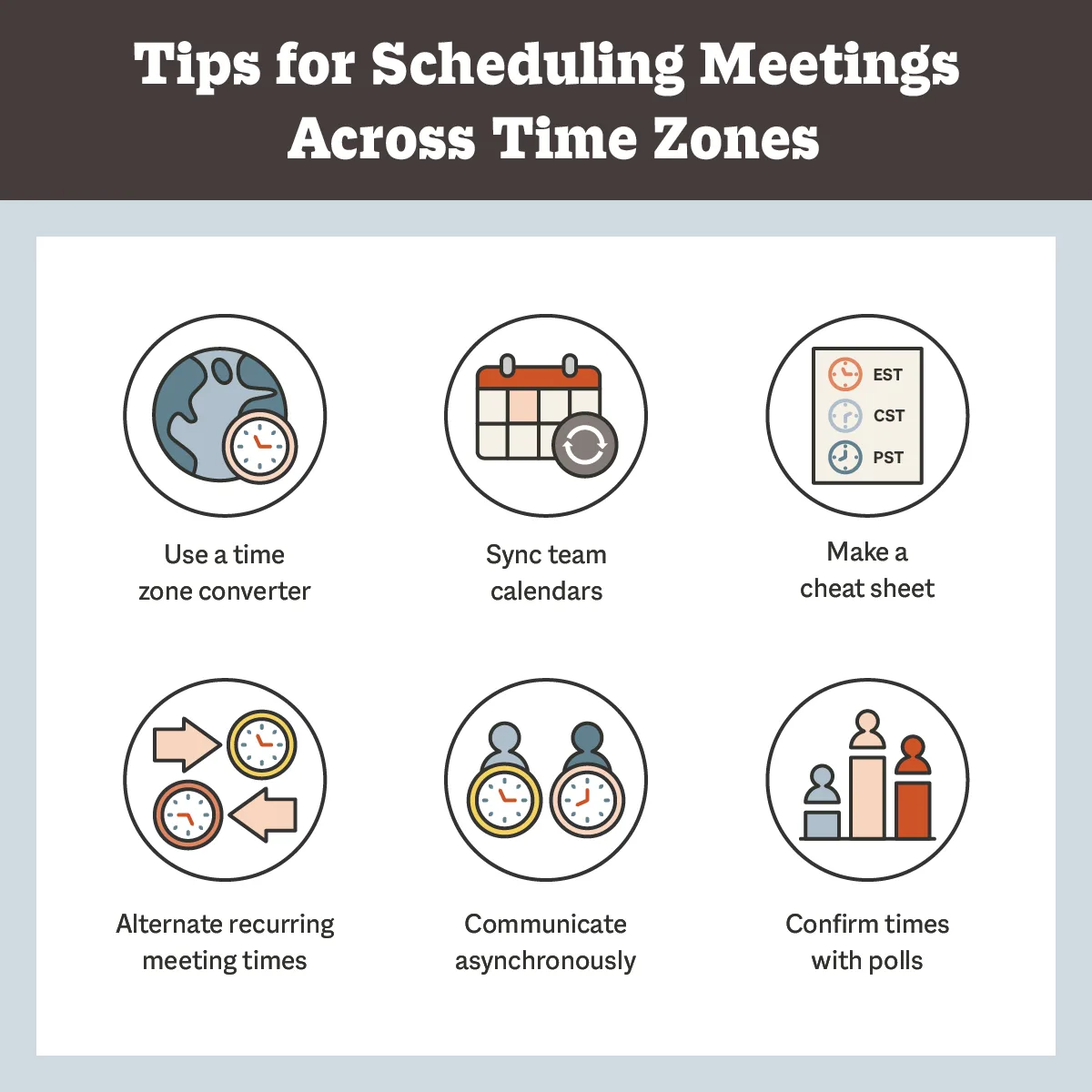
Image source: Web (Bing) / smith.ai (Web image (fair-use with source credit))
When evaluating options, look past the timezone converter headline feature. Check whether the platform validates actual availability intersections, not just converted display times. Verify how it handles half-hour offset zones like Nepal UTC+5:45, which trip up even mature scheduling tools.
Confirm whether meeting invitations include automatic participant-local-time formatting so nobody has to guess. These details determine whether your system holds together when your team spans four regions instead of two.
The right choice depends entirely on how your work actually flows across time zones.
Solo consultants and freelancers usually benefit most from AI scheduling platforms. One person managing clients across three or four zones doesn't need a human VA sitting between them and their calendar. A well-configured booking link with smart buffers handles the heavy lifting.
Look into how virtual assistants streamline calendly management if you later outgrow the solo setup.
Growing remote teams with 5 to 20 members spread across EMEA and APAC often hit a wall with pure AI. Overlap conflicts multiply, handoff windows get unclear, and the scheduling tool becomes a source of confusion rather than relief. In this stage, adding a human VA for exception handling and managing appointments fills the gaps that automation misses.
Many teams run both systems in parallel, letting AI handle standard bookings and the VA step in whenever things get tangled.
Agencies and consultancies juggling rotating global shifts lean heavily toward human VAs. Shift overlaps, staggered handoffs, and client renegotiations create edge cases that no scheduler configures well upfront. A dedicated scheduling VA organizes your calendar around real-world patterns instead of forcing those patterns into rigid tool rules.
Enterprise sales teams running high-volume demo booking across continents typically combine both. AI powers the landing-page booking widget for inbound leads. Human VAs coordinate complex multi-party meetings and schedule Google Meet or Zoom sessions that involve executives in different zones.
The decision isn't really AI versus human. It's about which part of your workflow demands which kind of intelligence, and whether your current setup is stretching either one too thin.
Most timezone scheduling failures aren't dramatic collapses. They're small erosions that stack up until clients stop showing, team members start resenting the process, and someone finally notices the pattern. The common mistakes follow recognizable patterns.
Assuming calendar sync means timezone sync. Just because your Google Calendar connects to Outlook or vice versa doesn't guarantee accurate conflict checking across zones. Integration handles format translation. It doesn't always validate availability intersections.
Ignoring DST transition periods. The two weeks surrounding a daylight saving switch are when double-bookings and misaligned recurring meetings hide. If your tool doesn't flag potential drift proactively, you'll discover it the hard way when a stakeholder in a non-DST region shows up confused.
Skipping overlap validation before rolling out. Testing a scheduler with one timezone is easy. Testing it across four simultaneous zones with shared team availability reveals blind spots instantly. Skipping that step means you launch with a system that looks fine until someone books over a colleague's commitment.
Mixing platform rules without a master reference. Running one tool for North America and another for EMEA/APAC creates conflicting availability logic. Two separate booking links mean two sets of buffer settings, two DST strategies, and zero consolidated visibility into who's actually free globally.
Relying on manual availability updates. Human input introduces delay and error. When team members forget to update their calendars after returning from travel or shifting work hours, the scheduler books against stale data. This feeds directly into the problems solved when you hire a virtual assistant to manage your calendar.
Treating timezone conversion as a presentation feature rather than a validation layer. Showing a meeting time in six different zone formats looks polished. It means nothing if the underlying tool allowed the booking to conflict with an existing commitment in one of those zones. Presentation without validation is just cosmetic.
The mistakes with the highest cost are the ones nobody catches immediately. A client who books across zones expecting a 10 AM Tuesday call, only to find it's actually 10 AM Monday in their city, won't mention it. They'll just stop coming back.
Buying into a scheduling system without validating its timezone handling is how double-bookings multiply. A structured test catches failures before they cost you meetings.
Run these steps before paying for a premium plan or handing over your calendar access.
Phase 1: Free Tier Stress Test
Phase 2: Overlap Simulation
Phase 3: Integration Sanity Check
Phase 4: Team Pilot
This process costs nothing but a few hours upfront. It reveals whether a virtual assistant for scheduling appointments can actually handle global coordination or if it just looks good on a product page.
Skipping this validation is like buying software based on screenshots instead of live demos. The features exist in theory. They fail under pressure in practice.
AI platforms automate availability matching and conflict detection through algorithms. Human VAs coordinate manually by reading email, chat, and context to resolve edge cases. AI scales faster.
Humans adapt better when situations fall outside preset rules.
AI scheduling tools run roughly $10 to $30 per user per month on paid plans. Human VA services charge between $15 and $50 per hour depending on complexity and region. Many operations blend both, using AI for routine volume and VAs for exceptions.
Most modern platforms adjust recurring events automatically during DST transitions. However, accuracy varies by vendor and regional rule complexity. Always verify behavior around transition dates before committing to annual billing.
Tools that ignore half-hour offset zones like Nepal tend to be less reliable overall.
Hire a VA when your scheduling involves frequent last-minute rescheduling, complex multi-party negotiations, rotating global shifts, or clients who prefer personal coordination over self-service links. If your team constantly hits exceptions that break automation rules, human support fills the gap.
Yes. Cross-border scheduling often involves processing personal calendar data across jurisdictions. GDPR, CCPA, and similar frameworks impose obligations on data residency and consent.
Review your tool's privacy policy and cancel appointments handling procedures carefully before uploading sensitive client information.
Look beyond timezone conversion displays. Test overlap detection, recurring-meeting stability through DST changes, support for unusual offsets, and whether invitations auto-format to each participant's local time. Free trials make these checks practical before any financial commitment.

Sofia Grant is a business efficiency expert with over a decade of experience in digital strategy and affiliate marketing. She helps entrepreneurs scale through automation, smart tools, and data-driven growth tactics. At TaskVive, Sofia focuses on turning complex systems into simple, actionable insights that drive real results.













You’re staring at a job post or a DM from a freelancer and you’ve landed on the same question a hundred business owners do: how much should I pay a virtual…

 If you’re searching how much does a virtual assistant make, you…
Hiring help without breaking the bank is a common struggle for many business owners. You need reliable support, but virtual assistant hourly rates can feel…