⚠️ Disclosure: This post contains affiliate links. We may earn a commission at no extra cost to you.
⚠️ Disclosure: This post contains affiliate links. We may earn a commission at no extra cost to you.


Managing clients as a virtual assistant sounds simple at first. You reply to emails, track tasks, schedule meetings, send updates, and keep clients happy.
Then one client becomes three. Three becomes eight. Suddenly, client notes live in Gmail, deadlines sit in Google Calendar, files are inside Drive, payments are tracked in a spreadsheet, and task updates are buried somewhere in Slack.
That is where CRM software helps.
The best CRM for virtual assistants keeps client details, tasks, communication, follow-ups, files, invoices, and workflows in one organized place. It helps you manage clients without forgetting small details or jumping between too many tools.
In this guide, we’ll compare the best CRM tools for virtual assistants in 2026, including HubSpot CRM, ClickUp, Zoho CRM, Dubsado, HoneyBook, Trello with Crmble, Notion, Airtable, and Plutio.
The best CRM for virtual assistants depends on the type of work you manage.
HubSpot CRM is best for beginner VAs who need a free and simple contact management system. ClickUp is best for VAs who handle many tasks, projects, and deadlines. Zoho CRM is best for sales support VAs who manage leads and pipelines. Dubsado and HoneyBook are better for service-based VAs who need proposals, contracts, invoices, and client onboarding.
For virtual assistants who manage multiple clients, the best CRM should include client profiles, task tracking, follow-up reminders, communication history, file management, time tracking, invoicing, and automation.
If you want a simple starting point, choose HubSpot or Trello. If you need task-heavy client management, choose ClickUp. If you manage contracts and payments, choose Dubsado or HoneyBook. If you want an all-in-one client management system, Plutio is worth checking.
CRM software for virtual assistants is a tool that helps VAs manage client relationships, tasks, communication, notes, deadlines, and follow-ups in one place.
CRM stands for customer relationship management. In a normal business, a CRM is mostly used to track leads, sales deals, calls, emails, and customers. But for virtual assistants, CRM software needs to do more than store contacts.
A virtual assistant often manages daily admin work, social media tasks, inboxes, calendars, client projects, reports, and recurring work. So, a VA CRM should work like a client management hub.
A good CRM for virtual assistants helps you:
In simple words, a CRM helps virtual assistants stay organized, look professional, and manage more clients without losing control.
Virtual assistants deal with a lot of moving parts. A normal workday can include client emails, calendar changes, research tasks, meeting notes, reports, social media updates, lead tracking, and admin work.
Without a CRM, it becomes easy to miss details.
You may forget when to follow up. You may lose a client note. You may waste time searching for old messages. You may also struggle to see which client needs attention first.
A CRM solves this problem by keeping your client work organized.
Here’s why virtual assistants need CRM software:
Instead of saving client information across spreadsheets, emails, notes, and chat apps, a CRM stores everything in one profile. You can quickly find contact details, project notes, communication history, and task status.
Most VAs work with more than one client. Each client has different tasks, deadlines, preferences, and communication styles. A CRM helps you separate each client’s work clearly.
Follow-ups are easy to forget when work gets busy. CRM reminders help you follow up with leads, clients, vendors, or team members on time.
A CRM gives you a clear view of past conversations, notes, and updates. That means you do not need to ask the same question twice. Tiny thing, big trust points.
Many VA tasks repeat every week or month. A CRM can help you create templates, recurring tasks, checklists, and automations.
When you know every client detail, send updates on time, and keep work organized, clients trust you more. A CRM helps you work like a real operations partner, not just an extra pair of hands.
A normal sales CRM is built mainly for sales teams. It helps businesses track leads, sales calls, deals, pipelines, and revenue.
A CRM for virtual assistants is different.
Virtual assistants are not always managing sales pipelines. Many VAs manage daily client operations. That includes tasks, deadlines, calendars, documents, inboxes, social media content, reports, invoices, and client communication.
So, the best CRM for VAs should combine client management with workflow management.
Here is the main difference:
A sales CRM focuses on leads, deals, and revenue.
A VA CRM focuses on clients, tasks, deadlines, communication, and service delivery.
For example, a sales team may need lead scoring, call tracking, sales forecasting, and pipeline reports. A virtual assistant may need client notes, recurring tasks, SOPs, time tracking, client portals, and invoice records.
That is why the biggest CRM is not always the best CRM for virtual assistants. A lightweight and flexible CRM often works better than a complex enterprise platform.
| CRM Tool | Best For | Main VA Use Case | Free Plan | Main Limitation |
|---|---|---|---|---|
| HubSpot CRM | Beginner VAs | Contact management, email tracking, follow-ups | Yes | Advanced automation can get expensive |
| ClickUp | Task-heavy VAs | Projects, tasks, dashboards, workflows | Yes | Can feel overwhelming at first |
| Zoho CRM | Sales support VAs | Leads, pipelines, sales follow-ups | Yes | Setup may take time |
| Dubsado | Service-based VAs | Proposals, contracts, forms, invoices | Limited/trial-based | Learning curve during setup |
| HoneyBook | Creative and service VAs | Client flow, contracts, invoices, payments | Trial-based | Less flexible for complex workflows |
| Trello with Crmble | Simple workflow VAs | Visual boards and client tracking | Yes | Limited reporting and automation |
| Notion | Custom system lovers | Client database, SOPs, notes, task pages | Yes | Requires manual setup |
| Airtable | Data-heavy VAs | Client databases, content calendars, reporting | Yes | Can become complex |
| Plutio | Multi-client VAs | CRM, projects, time tracking, invoicing, portals | Trial/paid | Less known than bigger CRM brands |
Our editor’s pick for the best CRM for virtual assistants is ClickUp. It gives VAs a strong mix of client management, task tracking, project boards, deadlines, documents, reminders, dashboards, and workflow automation.
Most virtual assistants do not only need a place to store client names. They need a system to manage daily work. ClickUp works well because it can handle client records, recurring tasks, onboarding checklists, content calendars, project updates, and team collaboration in one workspace.
HubSpot is better if you only need a free contact CRM. Dubsado and HoneyBook are better if you need proposals, contracts, invoices, and client onboarding. But for most VAs managing multiple clients and daily tasks, ClickUp gives the best balance between flexibility, features, and practical use.
Best for: Virtual assistants who manage multiple clients, recurring tasks, deadlines, projects, and client workflows.
Why we picked it: ClickUp works as both a CRM and project management tool, which makes it more useful for everyday VA work than a sales-only CRM.
HubSpot CRM is one of the best free CRM tools for beginner virtual assistants. It is simple, clean, and easy to use for contact management.
You can use HubSpot to store client details, track communication, manage tasks, schedule meetings, and follow up with leads. It is also useful if you support a client’s sales or marketing team.
HubSpot works best for VAs who need a simple CRM without building everything from scratch.
Key features:
Best for:
HubSpot is best for beginner virtual assistants, sales support VAs, admin VAs, and VAs who manage client follow-ups.
Pros:
Cons:
Taskvive verdict:
HubSpot is a smart first CRM for virtual assistants. It is best when you need contact management, email tracking, and follow-up reminders. But if your main work is task delivery, project tracking, or invoicing, you may need another tool beside HubSpot.
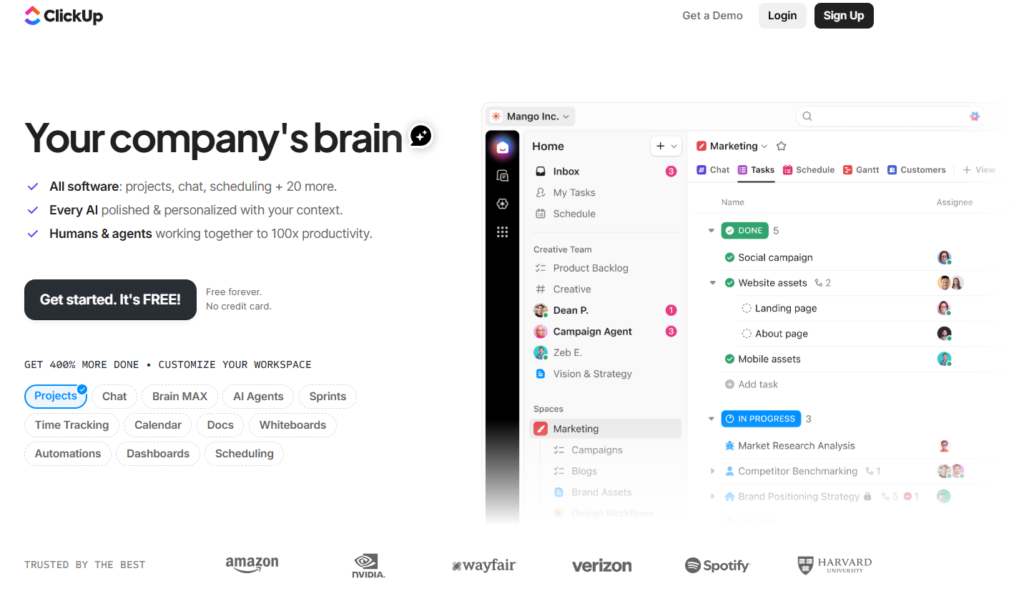
ClickUp is not a traditional CRM, but many virtual assistants use it as a CRM and project management system.
It is strong because it combines tasks, docs, dashboards, goals, chat, calendars, and templates. You can build a client database, create task boards, set recurring tasks, track deadlines, and manage multiple clients from one workspace.
ClickUp is especially useful for VAs who manage ongoing tasks for several clients.
Key features:
Best for:
ClickUp is best for task-heavy virtual assistants, project-based VAs, operations VAs, and VAs who manage many deadlines.
Pros:
Cons:
Taskvive verdict:
ClickUp is one of the best CRM-style tools for virtual assistants who manage daily work, deadlines, and client projects. It is not the simplest tool, but it becomes powerful once you set it up properly.
Zoho CRM is a strong option for virtual assistants who support sales teams, agencies, consultants, or small businesses.
It helps manage leads, contacts, deals, pipelines, emails, calls, and reports. If your VA role includes lead generation, cold outreach, sales follow-ups, or CRM admin work, Zoho CRM can be a good choice.
Zoho also works well for businesses already using other Zoho apps.
Key features:
Best for:
Zoho CRM is best for sales virtual assistants, lead generation VAs, CRM admin VAs, and VAs supporting small sales teams.
Pros:
Cons:
Taskvive verdict:
Zoho CRM is a good choice if your VA work is sales-focused. It is not the best option for simple admin task tracking, but it is strong for lead management and pipeline updates.
Dubsado is a business management tool for service providers. It is popular with freelancers, consultants, designers, coaches, and virtual assistants who need client onboarding tools.
Dubsado helps you manage leads, send proposals, collect forms, create contracts, send invoices, and automate workflows. This makes it useful for VAs who run their own client-based business.
It is especially helpful when you want to create a polished client experience.
Key features:
Best for:
Dubsado is best for service-based virtual assistants, freelance VAs, executive assistants, and VAs who manage client onboarding.
Pros:
Cons:
Taskvive verdict:
Dubsado is best for VAs who run their own service business and need contracts, invoices, forms, and onboarding workflows. It is less useful if you only need a basic contact CRM.
HoneyBook is a client relationship platform for small businesses and service providers. It helps manage inquiries, proposals, contracts, invoices, payments, and projects.
Virtual assistants who work with creative clients may find HoneyBook useful. It keeps client booking, paperwork, and payments in one flow.
HoneyBook is known for its simple client experience. It is often easier to understand than more complex CRM systems.
Key features:
Best for:
HoneyBook is best for creative virtual assistants, freelance VAs, social media VAs, and VAs who manage service-based clients.
Pros:
Cons:
Taskvive verdict:
HoneyBook is a good CRM for VAs who want an easy way to handle inquiries, proposals, contracts, invoices, and payments. It is a solid choice for client-facing work.
Trello is a simple visual project management tool. With the Crmble Power-Up, you can turn Trello into a lightweight CRM.
This setup works well for virtual assistants who like Kanban boards. You can create lists for leads, active clients, follow-ups, completed work, and paused clients.
Each client can become a card. Inside each card, you can add notes, checklists, due dates, files, comments, and labels.
Key features:
Best for:
Trello with Crmble is best for beginner VAs, visual thinkers, admin VAs, and VAs who want a simple CRM board.
Pros:
Cons:
Taskvive verdict:
Trello with Crmble is great if you want a simple and visual CRM. It is not the most advanced option, but it works well for VAs who want a light system without overthinking it.
Notion is an all-in-one workspace for notes, docs, projects, databases, and knowledge management. It is not a traditional CRM, but many virtual assistants use it to build custom client dashboards.
You can create a Notion CRM with client databases, task lists, project pages, SOP libraries, meeting notes, content calendars, and follow-up trackers.
Notion works best if you enjoy building your own system.
Key features:
Best for:
Notion is best for organized VAs, content VAs, admin VAs, and VAs who want a custom workspace.
Pros:
Cons:
Taskvive verdict:
Notion is best for virtual assistants who want a custom client management system. It is powerful, but only if you are willing to build and maintain your setup.
Airtable is a flexible database tool that can work as a CRM, project tracker, content calendar, or reporting system.
It looks like a spreadsheet, but it is more powerful. You can create custom fields, views, filters, automations, and dashboards.
Airtable is useful for VAs who manage structured data. For example, you can track clients, leads, content tasks, outreach lists, invoices, deliverables, and project status.
Key features:
Best for:
Airtable is best for data-heavy virtual assistants, operations VAs, content VAs, and VAs who manage lists, records, and reports.
Pros:
Cons:
Taskvive verdict:
Airtable is best for VAs who manage structured client data. It is stronger than a spreadsheet, but it needs a clear setup to avoid becoming messy.
Plutio is an all-in-one business management platform for freelancers, agencies, and virtual assistants. It combines CRM, projects, tasks, proposals, contracts, time tracking, invoicing, and client portals.
This makes it useful for VAs who want fewer separate tools.
Instead of using one tool for tasks, one for time tracking, one for invoices, and one for client communication, Plutio brings these workflows together.
Key features:
Best for:
Plutio is best for multi-client virtual assistants, freelance VAs, and VAs who need a full client management system.
Pros:
Cons:
Taskvive verdict:
Plutio is a strong option for virtual assistants who want CRM, tasks, time tracking, invoices, contracts, and client portals in one place. It is best for VAs who already manage several clients and want a more complete system.
The best CRM depends on your work style. Here is a simple breakdown.
HubSpot CRM is a good free option for VAs who need contact management, task reminders, email tracking, and a basic pipeline.
ClickUp is best for VAs who manage many tasks, deadlines, and recurring workflows for clients.
Zoho CRM is best for VAs who manage leads, sales pipelines, follow-ups, and reports.
Dubsado is best for VAs who need proposals, contracts, questionnaires, invoices, and automated onboarding.
HoneyBook is best for VAs working with coaches, designers, photographers, consultants, and other creative service providers.
Trello with Crmble is best for VAs who want a simple board-based CRM.
Notion is best for VAs who want to build their own client dashboard, SOP hub, and task system.
Airtable is best for VAs who manage structured client data, outreach lists, content calendars, or reports.
Plutio is best for VAs who want CRM, project management, time tracking, invoices, contracts, and client portals in one platform.
A virtual assistant should not choose a CRM only because it is popular. The tool should match daily work.
Here are the most important CRM features for VAs.
The CRM should store client names, emails, phone numbers, company details, social profiles, and key notes.
You should be able to create tasks, add due dates, assign priorities, and track progress.
A CRM should remind you when to follow up with clients, leads, vendors, or team members.
It should help you track emails, notes, calls, meetings, and past client updates.
If you manage deliverables, choose a CRM with boards, timelines, calendars, or project views.
Time tracking is important if you bill hourly or work on retainers.
Some VAs need built-in invoices, payment links, contracts, or proposals.
A client portal helps clients check updates, files, invoices, and project status without sending extra messages.
Automation helps reduce repeated work. You can automate reminders, task creation, onboarding emails, and follow-ups.
The CRM should connect with tools like Gmail, Outlook, Google Calendar, Slack, Zoom, Zapier, Google Drive, and payment tools.
Reports help you see open tasks, active clients, pending invoices, completed work, and sales progress.
A free CRM is enough when you are just starting. If you only manage a few clients, tools like HubSpot, Trello, Notion, ClickUp, or Airtable can work well.
Free CRMs are useful for:
But free tools often have limits. You may get fewer automations, limited dashboards, fewer integrations, lower storage, or no client portal.
A paid CRM makes more sense when you manage several clients or run a VA business full-time.
Paid CRMs are better for:
The simple rule is this:
Start with a free CRM if you are organizing your work. Move to a paid CRM when your CRM starts protecting your income, saving time, and improving client experience.
Choosing the right CRM becomes easier when you look at your actual workflow.
Start with these questions:
If you manage one to three clients, a simple CRM may be enough. If you manage five or more clients, choose a tool with stronger task tracking and automation.
Admin VAs may need contact records, reminders, and notes. Social media VAs may need content calendars and approval workflows. Sales VAs need lead tracking and pipelines. Executive VAs need calendars, tasks, and communication history.
If you send invoices, proposals, or contracts, choose Dubsado, HoneyBook, or Plutio.
Solo VAs can use simpler tools. VA agencies need team roles, permissions, dashboards, and client portals.
If clients need to view updates, approve work, or pay invoices, choose a CRM with a client portal.
If you want simple, choose HubSpot, Trello, or HoneyBook. If you want flexible, choose ClickUp, Notion, Airtable, or Plutio.
Use this checklist when setting up your CRM.
Add each client’s name, company, email, phone number, website, timezone, service type, and communication preference.
Include key details like working hours, preferred update style, login rules, brand guidelines, recurring tasks, and approval process.
Set up categories such as admin, email, calendar, research, social media, reporting, customer support, and follow-up.
You can use pipeline stages like:
Create recurring tasks for weekly reports, email checks, calendar reviews, content scheduling, invoice reminders, and client updates.
Add reminders for leads, unpaid invoices, client feedback, pending approvals, and renewal dates.
Add contracts, SOPs, brand guides, login instructions, templates, meeting notes, and project briefs.
Connect Gmail, Outlook, Google Calendar, Google Drive, Slack, Zoom, Zapier, or payment tools where needed.
Prepare templates for onboarding, weekly updates, meeting notes, task requests, project reports, and client follow-ups.
A CRM only works when it stays updated. Set one weekly review time to clean tasks, update notes, and check pending follow-ups.
A CRM can save you time, but only if you use it correctly.
Here are the most common mistakes VAs make.
Do not pick a CRM just because it has many features. If the tool is too hard to use, you will stop using it.
Old notes create confusion. Keep client details, task status, and communication history updated.
If your CRM, task tracker, invoice tool, and notes app do not connect, your workflow becomes harder. Keep your setup simple.
A CRM should help you take action. Set reminders and actually use them.
Templates save time. Create templates for repeated tasks, updates, onboarding, and reports.
Each client should have a separate profile, folder, board, or workspace. This keeps work clean and avoids mistakes.
If you bill hourly, track time inside your workflow. Do not rely on memory. Memory is cute, but not invoice-proof.
The best CRM for virtual assistants depends on the work they manage. HubSpot is best for beginners, ClickUp is best for task-heavy work, Zoho CRM is best for sales support, and Dubsado or HoneyBook is best for proposals, contracts, and invoices. Plutio is a strong option for VAs who want CRM, projects, time tracking, invoicing, and client portals in one place.
Yes, virtual assistants need a CRM if they manage clients, tasks, deadlines, follow-ups, or communication. A CRM helps keep client details, notes, emails, tasks, files, and reminders organized.
HubSpot CRM is one of the best free CRM tools for virtual assistants. ClickUp, Trello, Notion, and Airtable also offer useful free options for VAs who need task tracking, client notes, or custom workflows.
ClickUp is not a traditional CRM, but virtual assistants can use it as a CRM. It works well for managing clients, tasks, deadlines, documents, recurring workflows, and project updates.
HubSpot is good for virtual assistants who need contact management, email tracking, meeting scheduling, and follow-up reminders. It is especially useful for beginner VAs and sales support VAs.
A beginner virtual assistant can start with HubSpot CRM, Trello, Notion, or ClickUp. These tools are easy to start with and can support basic client management.
ClickUp, Airtable, Notion, and Plutio are good options for managing multiple clients. They help organize client records, tasks, files, deadlines, and workflows.
A VA CRM should include contact management, task tracking, follow-up reminders, communication history, project tracking, file storage, time tracking, invoicing, automation, and integrations.
Yes, Notion can work as a CRM for virtual assistants. You can create client databases, task boards, project pages, SOP libraries, and meeting notes. It is best for VAs who like custom systems.
Yes, Trello can be used as a simple CRM. You can create boards for leads, active clients, follow-ups, and completed work. With Crmble, Trello becomes more CRM-friendly.
The best CRM for virtual assistants is the one that fits your daily work.
If you only need basic contact management, HubSpot CRM is a strong free choice. If your work is task-heavy, ClickUp is better. If you support sales teams, Zoho CRM makes sense. If you need contracts, invoices, proposals, and onboarding, Dubsado or HoneyBook can help. If you like custom systems, Notion or Airtable gives you more control. If you want CRM, projects, time tracking, invoicing, and client portals in one place, Plutio is a solid all-in-one option.
Do not choose a CRM only because everyone talks about it. Choose the tool that helps you manage clients, protect your time, reduce missed follow-ups, and deliver better work.
A good CRM should make your virtual assistant business feel lighter, not more confusing. That is the whole point.

Sofia Grant is a business efficiency expert with over a decade of experience in digital strategy and affiliate marketing. She helps entrepreneurs scale through automation, smart tools, and data-driven growth tactics. At TaskVive, Sofia focuses on turning complex systems into simple, actionable insights that drive real results.



















You’re drowning in email, your calendar is chaos, and you wonder how to manage virtual assistants remotely without spending all day managing them. Most guides…
Managing a virtual assistant doesn’t require a rigid playbook, it requires the right framework for your specific situation. If you’ve ever struggled with…
 Image source: Bing (Web (fairuse with source credit)) how to…