⚠️ Disclosure: This post contains affiliate links. We may earn a commission at no extra cost to you.
⚠️ Disclosure: This post contains affiliate links. We may earn a commission at no extra cost to you.

The search for the best free AI assistant for work often ends in decision fatigue rather than clarity. You don't need every feature. You need one that fits the actual tasks you face daily.
Our research shows that matching the tool to your role matters more than chasing raw capability.
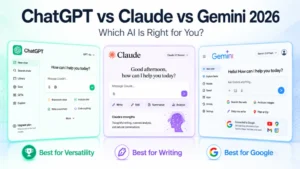
Google's Gemini free tier processes input up to two million tokens, while OpenAI's ChatGPT caps around 128K tokens on comparable plans. Anthropic offers Claude with a 200K token window, and Microsoft's Copilot routes queries through Bing's live search index. Let's break down what each option actually delivers and where it shines.
No single assistant dominates every professional scenario. Your ideal tool hinges on three variables: primary task type, integration needs, and tolerance for limits. Writers prioritize fluent text generation.
Developers need accurate code reasoning. Researchers value real-time web access. If your work involves drafting client emails, summarizing meeting notes, or generating structured outlines, you can safely pick a generalist model.
If your days revolve around debugging Python scripts, building React components, or parsing PDF contracts, you'll want a specialized workflow like Build a Virtual Assistant Workflow in 7 Simple Steps to keep outputs consistent. Aggregating data across multiple platforms also pushes you toward assistants with deep integrations. The key is mapping your most frequent tasks before comparing features.
| Primary Task | Recommended Assistant | Key Limitation |
|---|---|---|
| Email and document drafting | ChatGPT | Strict daily message cap |
| Code generation and debugging | Amazon Q Developer | Limited non-coding context |
| Real-time research | Perplexity | Fewer long-form writing tools |
| Multimodal uploads | Google Gemini | Slower response times |
| Enterprise SSO workflows | Microsoft Copilot | Requires organizational account |
You can mix two assistants during a single week without breaking workflow consistency. Pairing ChatGPT for copy with Gemini for image analysis covers eight typical office scenarios. Just track your hourly usage to avoid repeated rate-limit interruptions.
NIST AI Risk Management Framework guidelines stress documenting which tool handles sensitive inputs.
Each major player offers a functional free version, but the boundaries differ sharply. OpenAI's ChatGPT remains the household name. Its free tier grants access to GPT-4o mini with moderate token pacing.
Google bundles Gemini into Workspace and provides a standalone web interface. Anthropic positions Claude as the careful, verbose writer. Microsoft repackages Copilot inside Edge and Office apps.
Perplexity focuses on sourced answers rather than open-ended creation.
ChatGPT excels at polished prose and structured brainstorming. Users report reliable tone matching for business correspondence. The interface supports file uploads and basic plugin calls within quotas.
Daily message limits reset overnight, so heavy morning users may hit walls by afternoon.
Gemini accepts documents, images, and audio in a single prompt. The extended context window reduces back-and-forth when reviewing lengthy reports. Workspace integrations auto-fill calendar events and Gmail drafts if you grant permissions.
Some enterprise environments block Gemini due to data residency policies.
Claude favors thoroughness and factual caution. It refuses hallucinated citations more often than competing models. The free web chat caps session length and restricts advanced features like extended thinking mode.
Output quality feels slightly slower but consistently accurate for compliance-heavy writing.
Copilot merges conversational AI with live Bing results. It surfaces source links directly inside responses. The tool integrates smoothly with Edge sidebar and Outlook web add-ins.
Corporate accounts often mandate Copilot instead of third-party chatbots.
Perplexity anchors every answer with citations. Researchers appreciate its transparent sourcing. Amazon Q Developer targets coding environments and AWS SDK queries.
Mistral provides multilingual models with generous free usage quotas. These alternatives fill gaps that generalists leave behind.
Choosing among these heavyweights requires checking which platforms your team already trusts. If your organization standardizes on Job Search Platform Comparison: Find Your Perfect Career Match, swapping tools creates friction. Start with the assistant that aligns closest to your existing stack.
Comparing specifications alone misleads buyers. Response speed depends heavily on server load and request complexity. A 500-word summary may arrive in ten seconds during off-peak hours but take thirty seconds when demand spikes.
Token limits determine how much text you can paste in one go. Most free tiers cap incoming tokens between 32K and 200K.
| Feature | ChatGPT Free | Gemini Free | Claude Free | Copilot Free |
|---|---|---|---|---|
| Max output length | ~4K tokens | ~8K tokens | ~4K tokens | ~2K tokens |
| File upload support | Yes | Yes | Limited | No |
| Web search access | Paid-only | Built-in | Paid-only | Built-in |
| Coding environment | Basic | Basic | Basic | Basic |
| API access | No | No | No | No |
Speed benchmarks from aggregate reviews show Gemini processing multimodal prompts fastest. Claude trails slightly but produces longer coherent paragraphs. ChatGPT sits in the middle with the widest plugin ecosystem.
Copilot lags in standalone reasoning but gains ground via Bing's real-time indexing.
Privacy controls vary widely. ChatGPT lets you pause history training temporarily. Gemini retains uploads for personalization unless you toggle off activity controls.
Claude offers zero data retention by design, but you must use Pro for full privacy guarantees. Copilot shares data with Microsoft under enterprise agreements. Always review vendor privacy pages before uploading confidential material.
When scanning for limitations, look past marketing claims. Verify current token limits directly on provider sites. Google's official documentation updates frequently as they refine free-tier boundaries.
Keeping a simple spreadsheet of limits prevents costly mid-task resets.
Writers benefit most from ChatGPT's tone calibration. Marketers rely on Gemini's image generation and brief drafting. Researchers prefer Perplexity's citation chain for source verification.
Developers gravitate toward Amazon Q Developer for language-specific guidance. Executives use Copilot for email triage and meeting summaries.
Content creators need fast iteration and style adaptability. ChatGPT reproduces brand voice templates reliably. Gemini adds visual assets without switching apps.
Both offer browser extensions for clipboard copying. Pairing them with Free Skill Development Courses: Boost Your Virtual Assistant Career rounds out a complete education path.
Code assistants require precise syntax error handling and library recommendations. Amazon Q Developer maps directly onto AWS services. GitHub Copilot remains superior for enterprise repositories but lacks a meaningful free tier.
Use Claude for architectural explanations and security audits instead.
Fact-checking matters more than creative flair. Perplexity's inline citations save hours of source hunting. Gemini reads uploaded PDFs and extracts tables automatically.
Combine these skills when pursuing Online Jobs: Top 10 High-Paying Remote Opportunities that demand quick literature reviews.
Routine coordination favors Copilot's calendar and inbox integration. Microsoft 365 subscribers often receive complimentary seats. Non-subscribers should consider Gemini's free document parsing.
Cross-platform compatibility keeps workflows portable when changing employers.
Match your primary output type first. Then verify that the chosen assistant respects your data-handling boundaries. Running a two-week trial with real projects reveals friction points faster than benchmark tables ever will.
Free tiers intentionally throttle usage to drive upgrades. Expect soft caps after twenty to thirty messages, then queue delays during peak hours. Workarounds include scheduling high-volume tasks for early mornings, rotating between two assistants, and compressing prompts to reduce token waste.
Some teams maintain separate personal and work accounts to widen daily ceilings, though this violates most terms of service.
Hallucinations remain the silent productivity killer. Models invent citations, misquote statutes, and fabricate meeting attendees. Always verify names, dates, and numerical claims against original sources.
Treat AI output as a first draft, not final copy. Implement a simple fact-check checklist: locate source, confirm quote, cross-reference secondary evidence.
Privacy risks escalate quickly when handling client data or proprietary strategies. Public models store inputs to improve future generations unless you disable analytics. Use pseudonyms or generic placeholders for sensitive entities.
For regulated industries, deploy local open-source models via Remote Virtual Assistant Jobs: Beginner's Guide in 2026 environments. Storing prompts internally eliminates cloud leakage entirely.
Network administrators may block unvetted AI tools behind corporate firewalls. Request documented risk assessments before requesting exceptions. Cite ENISA AI cybersecurity guidelines to justify security reviews.
Establish clear acceptable-use policies so employees understand boundaries without guessing.
Balancing convenience against risk requires deliberate habits. Track where data travels, set usage schedules to dodge congestion, and verify critical outputs manually. Those small routines prevent costly errors far more effectively than expensive subscription upgrades ever could.

Building a sustainable routine matters more than chasing the latest feature. Start by mapping your daily tasks onto a simple matrix. List activities that consume the most time, then tag each as repetitive, creative, or analytical.
Repetitive work like formatting spreadsheets benefits from batch prompting. Creative brainstorming thrives on open-ended exploration. Analytical tasks demand verification loops before adoption.
Create separate browser profiles or workspaces for personal experimentation versus professional output. This separation prevents accidental data leakage when testing new plugins or sharing prompts. Schedule high-volume sessions during off-peak hours to dodge rate limits.
Early mornings often yield faster response times and lower queue depths across major platforms.
Adopt a three-step prompt framework for consistency: role, task, constraint. Specify who the assistant should act as, what concrete output you expect, and any boundaries like word count or citation style. This structure reduces back-and-forth revisions and produces usable drafts on the first attempt.
Keep a private glossary of refined prompts you reuse weekly.
Rotate between assistants based on task type rather than habit. Use ChatGPT for email drafting, Gemini for document analysis, and Perplexity for research verification. This multi-tool approach mimics how skilled professionals deploy specialized instruments.
Track usage metrics in a simple spreadsheet to identify which platform handles your workload most efficiently.
Integrate assistive tools directly into your existing software stack. Install browser extensions for quick clipboard summarization, configure desktop widgets for rapid question answering, and set up keyboard shortcuts for common operations. These micro-automations compound over time, saving minutes that accumulate into hours each week.
Establish a review checkpoint before finalizing any AI-generated deliverable. Verify facts against primary sources, adjust tone to match your audience, and remove generic phrasing that signals machine origin. Treat the output as raw material, not a finished product.
This habit preserves your professional credibility while still leveraging speed gains.
Yes, combining assistants covers more professional scenarios without overpaying for unused features. Pair ChatGPT for copy editing with Gemini for image analysis and Perplexity for fact-checking. Each tool handles its strength, reducing revision cycles.
Just rotate accounts strategically to stay within daily message limits.
Schedule heavy prompting for early morning or late evening when server load drops. Compress long documents into shorter prompts to conserve tokens. Maintain a secondary account on a different platform for overflow tasks.
Some professionals keep a dedicated notebook for queued requests they process during low-demand windows.
Never paste proprietary contracts, financial figures, or personally identifiable information into public models. Use pseudonyms and anonymized placeholders instead. For regulated industries, deploy local open-source alternatives or verify your organization's accepted-use policy first.
Review vendor privacy statements to confirm data retention practices before uploading sensitive material.
Amazon Q Developer targets AWS environments, while GitHub Copilot remains superior for enterprise repositories but lacks a meaningful free tier. Use Claude for architectural explanations and security audits. Stack ChatGPT for language-specific syntax questions.
Cross-reference outputs with official documentation to catch hallucinated API methods.
Yes, providers periodically upgrade base models and expand context windows even on unrestricted plans. Monitor release notes to adopt newer capabilities like vision or extended reasoning when they appear. Some features migrate from paid exclusives to free access as infrastructure scales.
Staying current prevents workflow stagnation.











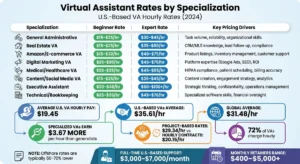


You’re staring at a job post or a DM from a freelancer and you’ve landed on the same question a hundred business owners do: how much should I pay a virtual…

 If you’re searching how much does a virtual assistant make, you…
Hiring help without breaking the bank is a common struggle for many business owners. You need reliable support, but virtual assistant hourly rates can feel…